
MP4 Video Playe
Creator: melodyCY · 2026-09-19 · Mods · Free on Eaglercraft Studio
Download MP4 Video Playe — free Minecraft mod. Created by melodyCY. Tagged functional. Check the file details for Forge, Fabric, or NeoForge before installing.
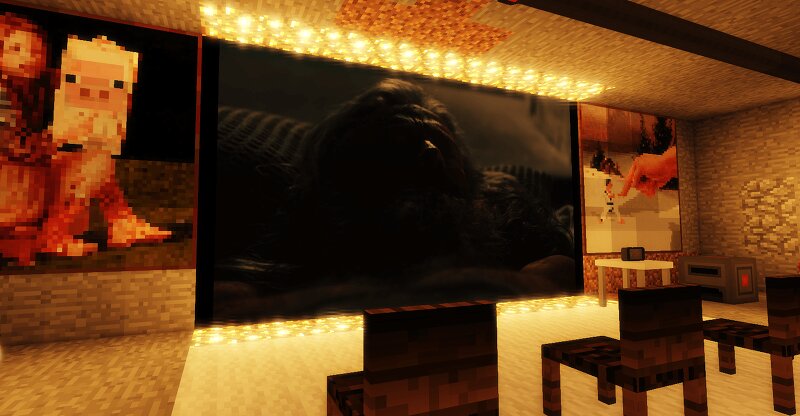
Creator notes
Play your own MP4 videos on cinema screens you build in Minecraft. Multi-block screens, full playback controls, and synchronised viewing for everyone on the server. About MP4 Video Player adds a Cinema Screen block that plays real mp4 video files inside your world. Build a screen out of as many blocks as you like, drop your videos into a folder, and press play. A decoder (FFmpeg) is bundled with the mod, so there is nothing extra to install or configure. It works out of the box on Windows. Features - Cinema Screen block: place it, right-click it, control it. - Multi-block screens: put screens next to each other and they merge into one large display, up to 144 blocks (for example 12 by 12). - Your own videos: plays mp4 files from a local folder, including files inside sub-folders. - Full playback controls: play and pause, stop, skip back or forward 10 seconds, loop (off, single, list), mirror, quality (low, medium, high), volume and brightness. - Built-in decoder: FFmpeg is bundled, no separate install. - Multiplayer sync: the server keeps everyone's playback in step. - Permissions: only the player who placed the screen, or a server operator, can control it. Requirements Minecraft:
Added value
What’s included on this page
Preview, categories, compatibility, and tools on this page — not a bare file mirror.
- Creator
- melodyCY
- Source
- Minecraft downloads library on Eaglercraft Studio
- Type
- Minecraft mod
- Price
- Free download on Eaglercraft Studio
- Curation
- Listed with credit to melodyCY · studio preview & install guide
- Game Version
- Minecraft 1.12.2
- Compatible with
- Minecraft Java (match version / loader in facts)
- Tags
- Functional
Install guide
How to install this free Minecraft mod
Eaglercraft Studio listing with metadata, creator credit, and loader-aware install guidance.
- 1Download the jar/zip when available.
- 2Install the matching loader (Forge, Fabric, or NeoForge) for your Minecraft version.
- 3Drop the mod into your mods folder, then launch with that profile.
Wrong loader or game version usually crashes on startup — read the facts on this page first.
Related free mods
More curated mods from the same library section.

Pastelmooncrafting15 · 67 diamonds · 20 views

PotatoWolfie · 60 diamonds · 2 views

PotatoWolfie · 53 diamonds · 622 views

Janss_33PL · 47 diamonds · 940 views