
Multiplayer Tardis
Creator: SapphicDeveloper · 2026-04-07 · Mods · Free on Eaglercraft Studio
Download Multiplayer Tardis — free Minecraft mod. Created by SapphicDeveloper. Tagged fix. Check the file details for Forge, Fabric, or NeoForge before installing.
Creator notes
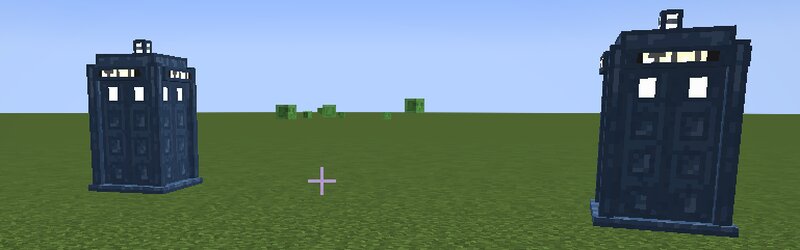
Multiplayer TARDIS: Companion for Teab's Doctor Who If you've ever wanted to properly experience Teab's Doctor Who Mod with your friends, you've likely run into a major roadblock. Due to the original mod's global state code, only one TARDIS can exist at a time, making true multiplayer essentially impossible without breaking the server. 🌌 Introducing Multiplayer TARDIS This companion mod fixes the single-TARDIS limitation, allowing you and your friends to finally explore time and space together! How it works: Under the hood, the mod utilizes targeted mixins to create a per-player data wrapper. To Teab's base mod, this simply looks like a standard map variable, but it effectively bypasses the global restriction so that multiple TARDISes can exist simultaneously—exactly one per player. ⚙️ Commands & Permissions To give you full control over who travels with you, the mod includes a built-in permissions system. You can easily manage your companions using the following commands: /companion grant <playername> — Grants a player permission to act as your companion and access your TARDIS. /companion revoke <playername> — Revokes a player's TARDIS access. ⚠️ Important Launcher Compatibility P
Added value
What’s included on this page
Preview, categories, compatibility, and tools on this page — not a bare file mirror.
- Creator
- SapphicDeveloper
- Source
- Minecraft downloads library on Eaglercraft Studio
- Type
- Minecraft mod
- Price
- Free download on Eaglercraft Studio
- Curation
- Listed with credit to SapphicDeveloper · studio preview & install guide
- Game Version
- Minecraft 1.21.1
- Compatible with
- Minecraft Java (match version / loader in facts)
- Tags
- Fix
Install guide
How to install this free Minecraft mod
Eaglercraft Studio listing with metadata, creator credit, and loader-aware install guidance.
- 1Download the jar/zip when available.
- 2Install the matching loader (Forge, Fabric, or NeoForge) for your Minecraft version.
- 3Drop the mod into your mods folder, then launch with that profile.
Wrong loader or game version usually crashes on startup — read the facts on this page first.
Related free mods
More curated mods from the same library section.

Pastelmooncrafting15 · 67 diamonds · 20 views

PotatoWolfie · 60 diamonds · 2 views

PotatoWolfie · 53 diamonds · 622 views

Janss_33PL · 47 diamonds · 940 views