
Mysli
Creator: Just_Biscuit · 2026-07-26 · Mods · Free on Eaglercraft Studio
Download Mysli — free Minecraft mod. Created by Just_Biscuit. Tagged other. Check the file details for Forge, Fabric, or NeoForge before installing.
Creator notes
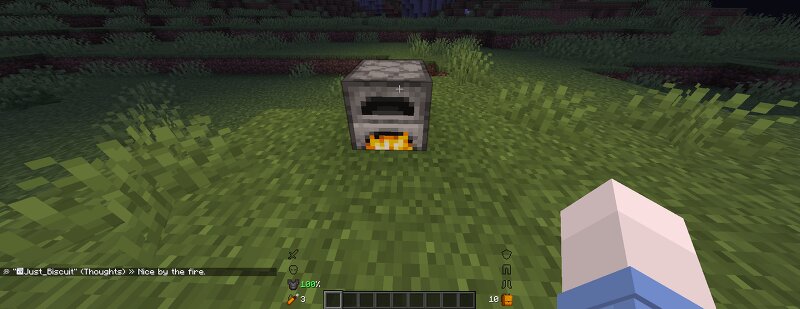
Mysli A mod that adds inner thoughts to your character. Mysli is a client-side mod (only you need it installed - nothing extra required on the server) that gives your character "inner thoughts": short reaction lines that occasionally show up in chat, visible only to you, based on what's happening in the game. cdn.modrinth.com/data/cached_images/b01178b269d3381fcdd8f0e6cf364a6499abf1cb.png Requirements: Cloth Config API (required) Mod Menu (optional, but recommended) – provides a convenient way to open the settings Chat Heads integration If you have Chat Heads installed, each thought message will display your character's face icon next to it in chat, making the "inner voice" feel even more personal and immersive. Opening the settings Mod Menu – if installed, open the mod list and click the Mysli icon. cdn.modrinth.com/data/cached_images/ebd7c88f43a70fcb5c90ba2baea1cc8f46eea536.png Hotkey – bound to Right Alt by default. Rebind it, or set up a second "mute/unmute thoughts" key, under Options → Controls → Mysli. cdn.modrinth.com/data/cached_images/8673d04a9460120e0470da4809b5eda6471426c8.png Settings are split across four tabs www.curseforge.com/linkout?remoteUrl=https%253a%252f%252fc
Added value
What’s included on this page
Preview, categories, compatibility, and tools on this page — not a bare file mirror.
- Creator
- Just_Biscuit
- Source
- Minecraft downloads library on Eaglercraft Studio
- Type
- Minecraft mod
- Price
- Free download on Eaglercraft Studio
- Curation
- Listed with credit to Just_Biscuit · studio preview & install guide
- Game Version
- Minecraft 26.1.2
- Compatible with
- Minecraft Java (match version / loader in facts)
- Tags
- Other
Install guide
How to install this free Minecraft mod
Eaglercraft Studio listing with metadata, creator credit, and loader-aware install guidance.
- 1Download the jar/zip when available.
- 2Install the matching loader (Forge, Fabric, or NeoForge) for your Minecraft version.
- 3Drop the mod into your mods folder, then launch with that profile.
Wrong loader or game version usually crashes on startup — read the facts on this page first.
Related free mods
More curated mods from the same library section.

Pastelmooncrafting15 · 67 diamonds · 20 views

PotatoWolfie · 60 diamonds · 2 views

PotatoWolfie · 53 diamonds · 622 views

Janss_33PL · 47 diamonds · 940 views