
Natyheim: Forgotten Past | Minecraft 26.2 Adventure Mod | CurseForge ModJam
Creator: xsoras · 2026-08-10 · Mods · Free on Eaglercraft Studio
Download Natyheim: Forgotten Past | Minecraft 26.2 Adventure Mod | CurseForge M — free Minecraft mod. Created by xsoras. Tagged adventure, ancient, antique, boss. Check the file details for Forge, Fabric, or NeoForge before installing.
Creator notes
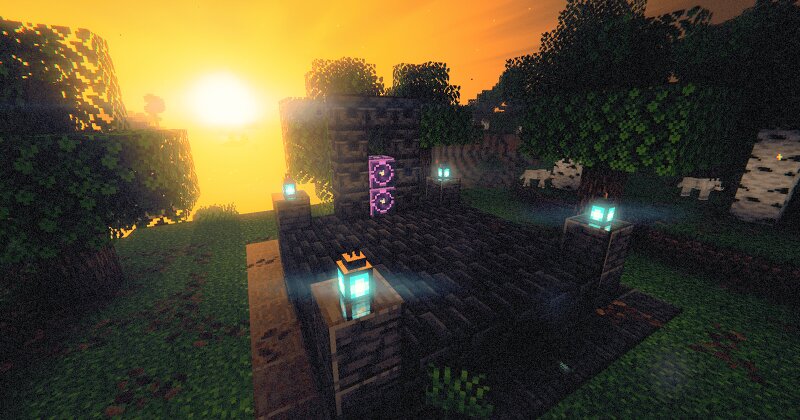
Minecraft 26.1.1 · 26.1.2 · 26.2 · 1.21.1 · 1.20.1 Fabric · NeoForge · Forge | English and Turkish | MIT 📖 Mod Wiki Seven civilisations lived here once. All seven fell, and nobody wrote down why. Most archaeology mods hand you artefacts. This one wants you to work out what killed the people who buried them, and it will not tell you the answer. You dig, you look at what comes up, and you decide what it means. If you're right, the Codex writes it down in your words. Do it for all seven and you find out they died of the same thing. There's no quest marker for that. There's a trench, a bench, a board, and whatever you're willing to conclude from three objects. Soundtrack Screenshots | The waygate. A relic, after dark, runes in order. | Natyheim. Drifting islands, seven sets of trials. | | The trench. A field lab over the hole makes the work methodical. | The writing. Unreadable until their bilingual tablet comes out of the ground. | | The Archivist. A person is the only thing that can honestly tell you where you are up to. | Relic pedestals. Crouch to read the card instead of lifting the piece out. | What you actually do Dig. Suspicious sand and gravel, in seven kinds of site. Five are
Added value
What’s included on this page
Preview, categories, compatibility, and tools on this page — not a bare file mirror.
- Creator
- xsoras
- Source
- Minecraft downloads library on Eaglercraft Studio
- Type
- Minecraft mod
- Price
- Free download on Eaglercraft Studio
- Curation
- Listed with credit to xsoras · studio preview & install guide
- Game Version
- Minecraft 26.2
- Compatible with
- Minecraft Java (match version / loader in facts)
- Tags
- Adventure, Ancient, Antique, Boss, Charm, Dimension
Install guide
How to install this free Minecraft mod
Eaglercraft Studio listing with metadata, creator credit, and loader-aware install guidance.
- 1Download the jar/zip when available.
- 2Install the matching loader (Forge, Fabric, or NeoForge) for your Minecraft version.
- 3Drop the mod into your mods folder, then launch with that profile.
Wrong loader or game version usually crashes on startup — read the facts on this page first.
Related free mods
More curated mods from the same library section.

Pastelmooncrafting15 · 67 diamonds · 20 views

PotatoWolfie · 60 diamonds · 2 views

PotatoWolfie · 53 diamonds · 622 views

Janss_33PL · 47 diamonds · 940 views