
Nautilus Shell Block
Creator: Aquarius_playz · 2025-12-21 · Mods · Free on Eaglercraft Studio
Download Nautilus Shell Block — free Minecraft mod. Created by Aquarius_playz. Tagged fabric, forge, neoforge, new content. Check the file details for Forge, Fabric, or NeoForge before installing.
Creator notes
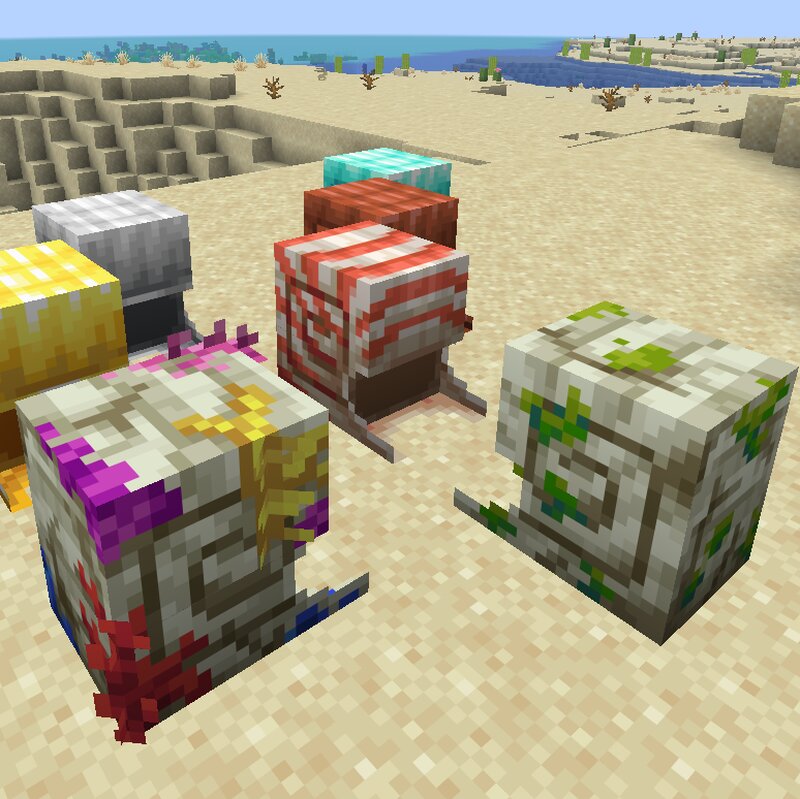
With this mod you can place the shell of the nautilus on the ground. All you need is the nautilus shell item and click with it on the ground. You can place it down in the direction you are looking. After a while when waterlogged or when its raining it can change its texture into the zombie nautilus one and later into the coral zombie one. You can manually change its texture too! To clean it, you can break it and then it will drop a normal nautilus shell item, making it have the default texture when placing it again. When its in default state, then using a slime ball on it has a chance to make it have the zombie texture. When its on default or zombie state, then using a coral on it has a chance to make it have the coral texture. There is an item json tag in the data folder for these, so you can change the required items for them. You can also place the nautilus armor blocks down on the ground! From version below 1.21.11, you can craft the nautilus armor blocks with a nautilus shell and an ingot from the armor type. When breaking it, it will drop the nautilus shell and the ingot too (in 1.21.11+ it will drop the armor instead of the ingot)! Mod currently supports Forge 1.21.11 | 1.21
Added value
What’s included on this page
Preview, categories, compatibility, and tools on this page — not a bare file mirror.
- Creator
- Aquarius_playz
- Source
- Minecraft downloads library on Eaglercraft Studio
- Type
- Minecraft mod
- Price
- Free download on Eaglercraft Studio
- Curation
- Listed with credit to Aquarius_playz · studio preview & install guide
- Game Version
- Minecraft 1.21.11
- Compatible with
- Minecraft Java (match version / loader in facts)
- Tags
- Fabric, Forge, Neoforge, New Content
Install guide
How to install this free Minecraft mod
Eaglercraft Studio listing with metadata, creator credit, and loader-aware install guidance.
- 1Download the jar/zip when available.
- 2Install the matching loader (Forge, Fabric, or NeoForge) for your Minecraft version.
- 3Drop the mod into your mods folder, then launch with that profile.
Wrong loader or game version usually crashes on startup — read the facts on this page first.
Related free mods
More curated mods from the same library section.

Pastelmooncrafting15 · 67 diamonds · 20 views

PotatoWolfie · 60 diamonds · 2 views

PotatoWolfie · 53 diamonds · 622 views

Janss_33PL · 47 diamonds · 940 views