
No Need Overlay
Creator: iListy · 2026-08-20 · Mods · Free on Eaglercraft Studio
Download No Need Overlay — free Minecraft mod. Created by iListy. Tagged bedwars, hypixel, other. Check the file details for Forge, Fabric, or NeoForge before installing.
Creator notes
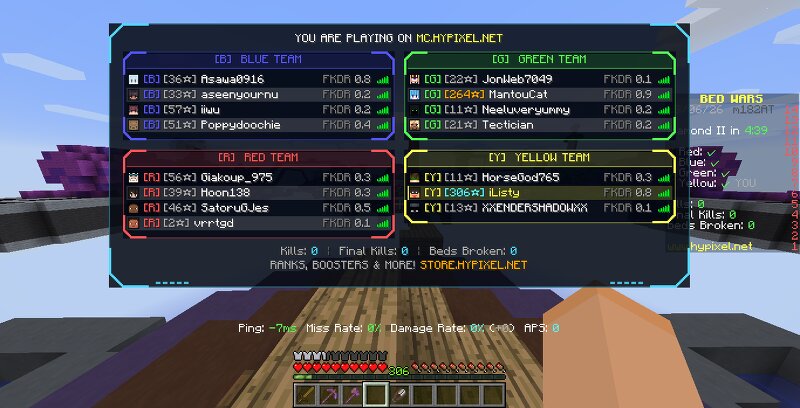
No Need Overlay Redesigned Hypixel BedWars tab list with per-team panels, prestige-coloured BedWars stars and FKDR from the Hypixel API. Features Bedwars Level/Stars: Bedwars level/star of all players in the game you're in. Final Kills/Deaths Ratio: Calculated FKDR (Final Kill/Death Ratio) of all players in the game you're in. Nicked players detection: Shows if a player is nicked in the game. Cheater detection: Shows if a player is cheating in the game and a list of all cheaters, including what they're tagged for. Chat alert: Combined Stars, FKDR, cheater's name with what cheat they're tagged for in party chat or team chat. Installation Vanilla Forge Download the latest release Place the .jar file in your Minecraft mods folder Launch Minecraft 1.8.9 with Forge installed Join Hypixel and set your API key (see Usage below) Lunar Client Download the latest LunarInstaller release. [Note: We tried uploading the jar directly on CurseForge, but they do not directly allow the Lunar agent. We messaged their support to resolve the issue, but haven't received any response yet. So you need to download from an external source; however, you might be cautious about whether it is a virus or not. I
Added value
What’s included on this page
Preview, categories, compatibility, and tools on this page — not a bare file mirror.
- Creator
- iListy
- Source
- Minecraft downloads library on Eaglercraft Studio
- Type
- Minecraft mod
- Price
- Free download on Eaglercraft Studio
- Curation
- Listed with credit to iListy · studio preview & install guide
- Game Version
- Minecraft 1.8.9
- Compatible with
- Minecraft Java (match version / loader in facts)
- Tags
- Bedwars, Hypixel, Other
Install guide
How to install this free Minecraft mod
Eaglercraft Studio listing with metadata, creator credit, and loader-aware install guidance.
- 1Download the jar/zip when available.
- 2Install the matching loader (Forge, Fabric, or NeoForge) for your Minecraft version.
- 3Drop the mod into your mods folder, then launch with that profile.
Wrong loader or game version usually crashes on startup — read the facts on this page first.
Related free mods
More curated mods from the same library section.

Pastelmooncrafting15 · 67 diamonds · 20 views

PotatoWolfie · 60 diamonds · 2 views

PotatoWolfie · 53 diamonds · 622 views

Janss_33PL · 47 diamonds · 940 views