
Norb's Video Mod
Creator: Norb · 2025-12-07 · Mods · Free on Eaglercraft Studio
Download Norb's Video Mod — free Minecraft mod. Created by Norb. Tagged animation, forge, mcreator, mod. Check the file details for Forge, Fabric, or NeoForge before installing.
Creator notes
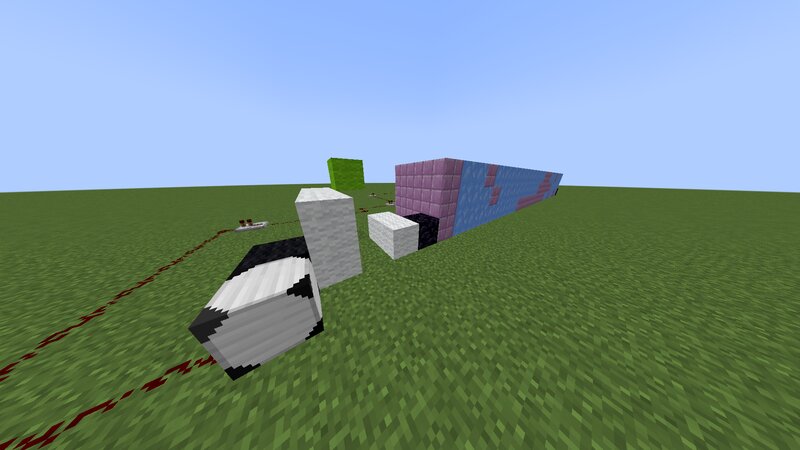
Hello, welcome to my video mod. This mod aims to bring animated videos into Minecraft via a simple video format that is read and played back by a single block (reader head). The format: So, step 1, make the reader head. This mod was designed to be usable in survival as well, so you could make theaters or other cool buildings in your world and have movies actually play in them. Place the reader head and then grab some black wool, and place it next to the reader head. Depending on which way you place it next to the reader head, that will be the moving direction of the RH. E.g. if you place the reader head in front of you while facing north, and you place the black wool on the left side, the RH will be moving north. Place it on the right and it will be moving south. This is the "calibration" step of the video format. Next up, we will move one block foreward and start specifying the XZ offset where the video will be rendered. These offsets are given in the form of two 8bit numbers where white wool means 1 and air means 0. For example, if the top view of your structure looks like this: White Wool White Wool White Wool Air Air Air Black Wool Reader Head That means the white wools add up
Added value
What’s included on this page
Preview, categories, compatibility, and tools on this page — not a bare file mirror.
- Creator
- Norb
- Source
- Minecraft downloads library on Eaglercraft Studio
- Type
- Minecraft mod
- Price
- Free download on Eaglercraft Studio
- Curation
- Listed with credit to Norb · studio preview & install guide
- Game Version
- Minecraft 1.19.2
- Compatible with
- Minecraft Java (match version / loader in facts)
- Tags
- Animation, Forge, Mcreator, Mod, New Content, Redstone
Install guide
How to install this free Minecraft mod
Eaglercraft Studio listing with metadata, creator credit, and loader-aware install guidance.
- 1Download the jar/zip when available.
- 2Install the matching loader (Forge, Fabric, or NeoForge) for your Minecraft version.
- 3Drop the mod into your mods folder, then launch with that profile.
Wrong loader or game version usually crashes on startup — read the facts on this page first.
Related free mods
More curated mods from the same library section.

Pastelmooncrafting15 · 67 diamonds · 20 views

PotatoWolfie · 60 diamonds · 2 views

PotatoWolfie · 53 diamonds · 622 views

Janss_33PL · 47 diamonds · 940 views