
Orbital Wolf Cannon
Creator: SlimeeyYt · 2026-04-01 · Mods · Free on Eaglercraft Studio
Download Orbital Wolf Cannon — free Minecraft mod. Created by SlimeeyYt. Tagged flamefrags, minecraft, new content, orbitalwolfcannon. Check the file details for Forge, Fabric, or NeoForge before installing.
Creator notes
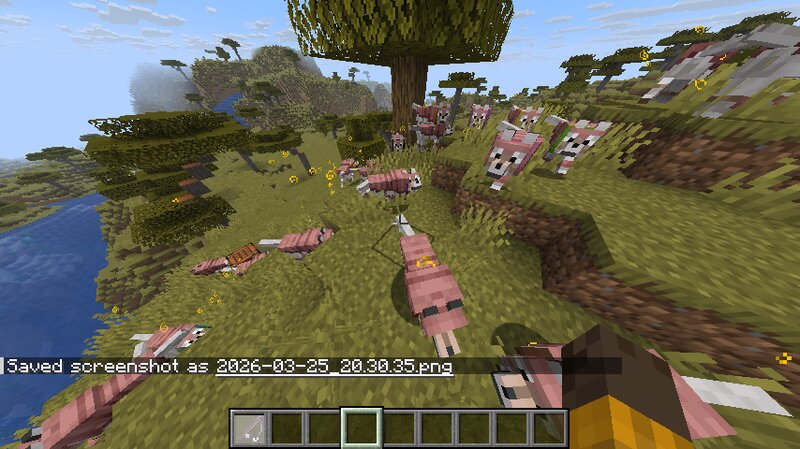
# 🐺 Orbital Wolf Cannon Unleash absolute chaos with a single right-click. **Orbital Wolf Cannon** introduces a powerful new item — the **Orbital Wolf Rod** — that allows you to instantly summon a full pack of loyal wolves in a perfect circle around you. Whether you're overwhelmed by mobs or just want to dominate the battlefield, this mod turns you into the alpha. --- ## ⚡ What Does It Do? Using the Orbital Wolf Rod will: - 🐺 Summon **48 wolves** in a perfect circular formation around you - 🛡️ Equip every wolf with **wolf armor** - 💪 Apply **Strength II for 5 minutes** to all wolves - 🎯 Automatically target and attack nearby hostile mobs - 🔵 Create a **cinematic particle ring effect** - 🔊 Play a powerful activation sound - ⏳ Apply a **cooldown** to prevent spam The result? A devastating wolf strike that instantly shifts combat in your favor. --- ## ⚙️ Fully Customizable A config file is automatically generated, giving you full control over the mod’s behavior: You can customize: - 🔢 Number of wolves - 📏 Spawn radius - ⏱️ Cooldown duration - 💪 Strength effect duration & level - 🐺 Wolf despawn time - 🎨 Particle effects (on/off) - 🔊 Sound effects (on/off) 📂 Config location: .minecraft/c
Added value
What’s included on this page
Preview, categories, compatibility, and tools on this page — not a bare file mirror.
- Creator
- SlimeeyYt
- Source
- Minecraft downloads library on Eaglercraft Studio
- Type
- Minecraft mod
- Price
- Free download on Eaglercraft Studio
- Curation
- Listed with credit to SlimeeyYt · studio preview & install guide
- Game Version
- Minecraft 1.21.11
- Compatible with
- Minecraft Java (match version / loader in facts)
- Tags
- Flamefrags, Minecraft, New Content, Orbitalwolfcannon, Other
Install guide
How to install this free Minecraft mod
Eaglercraft Studio listing with metadata, creator credit, and loader-aware install guidance.
- 1Download the jar/zip when available.
- 2Install the matching loader (Forge, Fabric, or NeoForge) for your Minecraft version.
- 3Drop the mod into your mods folder, then launch with that profile.
Wrong loader or game version usually crashes on startup — read the facts on this page first.
Related free mods
More curated mods from the same library section.

Pastelmooncrafting15 · 67 diamonds · 20 views

PotatoWolfie · 60 diamonds · 2 views

PotatoWolfie · 53 diamonds · 622 views

Janss_33PL · 47 diamonds · 940 views