
OverStack v3.4 add-on 1.21.130 Ultimate Stack Size & Inventory Manager
Creator: shadowGem100k · 2025-12-04 · Mods · Free on Eaglercraft Studio
Download OverStack v3.4 add-on 1.21.130 Ultimate Stack Size & Inventory Manager — free Minecraft mod. Created by shadowGem100k. Tagged addons, bedrock, fun, functional. Check the file details for Forge, Fabric, or NeoForge before installing.
Creator notes
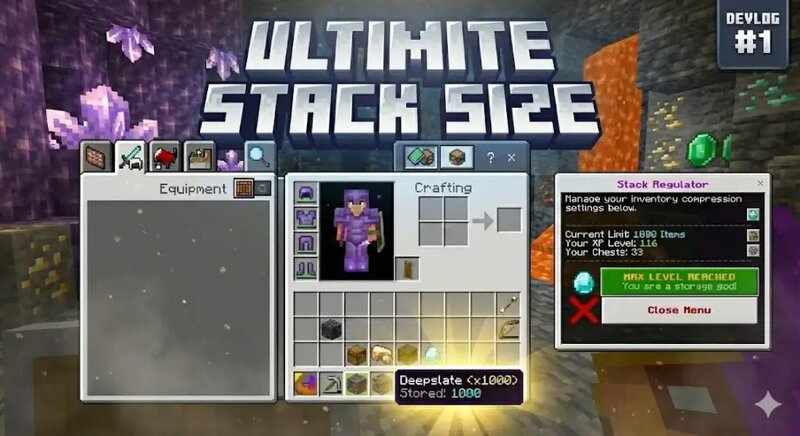
Tired of your inventory filling up after 5 minutes of mining? OverStack is a revolutionary Bedrock Edition Add-on that shatters the vanilla stack limit! Using advanced Scripting APIs, this add-on allows you to compress items into massive virtual stacks—up to 1,000 items per slot—keeping your inventory clean and organized. ✨ Key Features Break the 64 Limit: Store up to 1,000 items in a single inventory slot. The Stack Regulator: A specialized tool that manages your compression system. Progression System: Upgrade your stack limits using XP and Chests. Auto-Stacking: Items automatically compress as you pick them up. Safety Mode: Easily pause the system to craft or trade without issues. Visual Indicators: Items show their real count in the name tag (e.g., Deepslate (x1000) 🛠️ How It Works 1. The Stack Regulator When you load the world, the Stack Regulator item will appear in your inventory automatically (or check the Creative inventory). This item is your control panel. Right-Click (Use) the Regulator to open the Upgrade Menu . Sneak + Right-Click the Regulator to Pause/Resume the mod. Tip: Always PAUSE the mod before crafting with high-stack items! 2. Upgrade Tiers You start with a l
Added value
What’s included on this page
Preview, categories, compatibility, and tools on this page — not a bare file mirror.
- Creator
- shadowGem100k
- Source
- Minecraft downloads library on Eaglercraft Studio
- Type
- Minecraft mod
- Price
- Free download on Eaglercraft Studio
- Curation
- Listed with credit to shadowGem100k · studio preview & install guide
- Game Version
- Minecraft 1.21.11
- Compatible with
- Minecraft Java (match version / loader in facts)
- Tags
- Addons, Bedrock, Fun, Functional, Items, Mcpe
Install guide
How to install this free Minecraft mod
Eaglercraft Studio listing with metadata, creator credit, and loader-aware install guidance.
- 1Download the jar/zip when available.
- 2Install the matching loader (Forge, Fabric, or NeoForge) for your Minecraft version.
- 3Drop the mod into your mods folder, then launch with that profile.
Wrong loader or game version usually crashes on startup — read the facts on this page first.
Related free mods
More curated mods from the same library section.

Pastelmooncrafting15 · 67 diamonds · 20 views

PotatoWolfie · 60 diamonds · 2 views

PotatoWolfie · 53 diamonds · 622 views

Janss_33PL · 47 diamonds · 940 views