
Overworld Piglin
Creator: Jeezepizza · 2025-10-31 · Mods · Free on Eaglercraft Studio
Download Overworld Piglin — free Minecraft mod. Created by Jeezepizza. Tagged bedrock, minecraft, mod, other. Check the file details for Forge, Fabric, or NeoForge before installing.
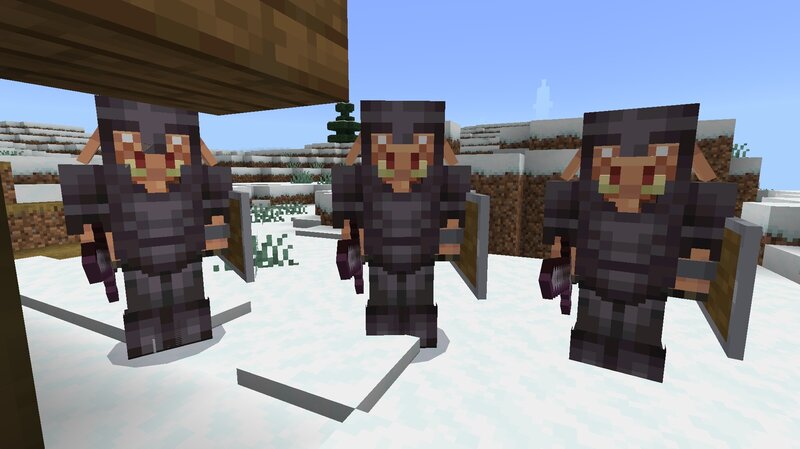
Creator notes
Ballonable, Spawnable, Summonable, Sittable, Sharable Tameable (follow owner / can teleport / stay while sitting) Nameable (always show / allow renaming), Follow range: 64 Can equip or pickup any item (even armor / value / max: 64) Health / Damage: 999999984306749400 Knockback resistance: 1.0 (like Warden, Wither, Ravager) Inventory size: 27 (items can be collected by hopper) Tame: Golden [apple (enchanted), carrot], (Baked, poisonous) potato Breathable: air / lava / solids / water (resist drowningdamage) Physics: has gravity & collision (push toward closet space) Amphibious movement: max turn 30 degree (more flexible than Axolotl) Nearest attackable [Owner hurt (by)] target: Hostile Mobs, Monsters. Generic navigation: can breach (like dolphin jumped out of the water), can path over water / lava, can sink, can climb, can reselect target, can swim (float), resist melee / ranged attack damage (Invulnerable) resist firedamage, resist freezedamage, resist suffocatingdamage If you want to see the full health of Overworld Piglin , you can download it from mcpedl. It is called health display plus(+) addon. This final mod update removes the ranged attack form (with crossbow), as it preve
Added value
What’s included on this page
Preview, categories, compatibility, and tools on this page — not a bare file mirror.
- Creator
- Jeezepizza
- Source
- Minecraft downloads library on Eaglercraft Studio
- Type
- Minecraft mod
- Price
- Free download on Eaglercraft Studio
- Curation
- Listed with credit to Jeezepizza · studio preview & install guide
- Game Version
- Minecraft 1.21.10
- Compatible with
- Minecraft Java (match version / loader in facts)
- Tags
- Bedrock, Minecraft, Mod, Other, Overworld, Piglin
Install guide
How to install this free Minecraft mod
Eaglercraft Studio listing with metadata, creator credit, and loader-aware install guidance.
- 1Download the jar/zip when available.
- 2Install the matching loader (Forge, Fabric, or NeoForge) for your Minecraft version.
- 3Drop the mod into your mods folder, then launch with that profile.
Wrong loader or game version usually crashes on startup — read the facts on this page first.
Related free mods
More curated mods from the same library section.

Pastelmooncrafting15 · 67 diamonds · 20 views

PotatoWolfie · 60 diamonds · 2 views

PotatoWolfie · 53 diamonds · 622 views

Janss_33PL · 47 diamonds · 940 views