
Paint Blocks
Creator: qrunk · 2026-05-28 · Mods · Free on Eaglercraft Studio
Download Paint Blocks — free Minecraft mod. Created by qrunk. Tagged art, decor, fun, mod. Check the file details for Forge, Fabric, or NeoForge before installing.
Creator notes
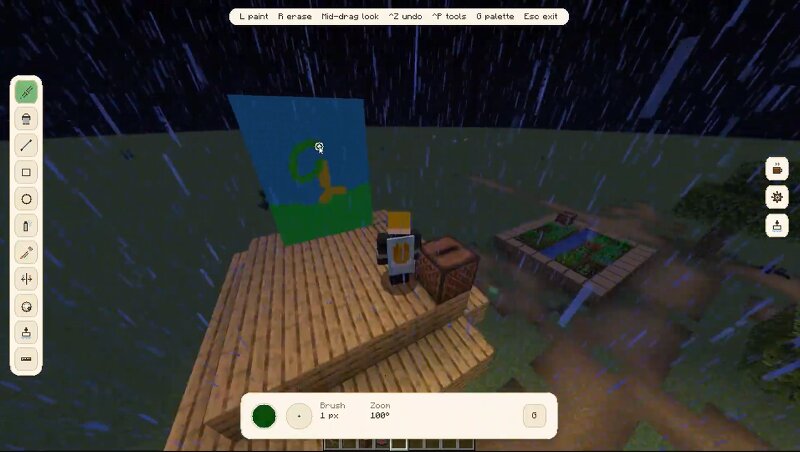
Paint Blocks is a Minecraft mod that allows players to draw directly onto blocks and create custom paintings entirely in-game. Whether you want to add signs, artwork, murals, pixel art, or unique decorations to your builds, Paint Blocks gives you the tools to turn your Minecraft world into a canvas. Features • Draw directly onto blocks in your world • Create and place custom paintings • Simple and intuitive in-game painting controls • Multiplayer compatible • Works in both Survival and Creative Mode • Perfect for builders, artists, roleplay servers, and custom maps Requirements Paint Blocks requires Fabric API and Fabric Language Kotlin to be installed. How to Use Press the P key to enter Paint Mode. Place a Canvas block to begin creating a custom painting. Use the available painting tools to draw, edit, and customize your artwork directly within Minecraft. Multiplayer Paint Blocks is designed to work in multiplayer environments, allowing players to create and share artwork together on servers. Support If you encounter bugs, have suggestions, or need help using the mod, join the community Discord server: discord.gg/fhfaWARm8S Bring your creativity into Minecraft and make every bloc
Added value
What’s included on this page
Preview, categories, compatibility, and tools on this page — not a bare file mirror.
- Creator
- qrunk
- Source
- Minecraft downloads library on Eaglercraft Studio
- Type
- Minecraft mod
- Price
- Free download on Eaglercraft Studio
- Curation
- Listed with credit to qrunk · studio preview & install guide
- Game Version
- Minecraft 1.21.1
- Compatible with
- Minecraft Java (match version / loader in facts)
- Tags
- Art, Decor, Fun, Mod, New Content, Paint
Install guide
How to install this free Minecraft mod
Eaglercraft Studio listing with metadata, creator credit, and loader-aware install guidance.
- 1Download the jar/zip when available.
- 2Install the matching loader (Forge, Fabric, or NeoForge) for your Minecraft version.
- 3Drop the mod into your mods folder, then launch with that profile.
Wrong loader or game version usually crashes on startup — read the facts on this page first.
Related free mods
More curated mods from the same library section.

Pastelmooncrafting15 · 67 diamonds · 20 views

PotatoWolfie · 60 diamonds · 2 views

PotatoWolfie · 53 diamonds · 622 views

Janss_33PL · 47 diamonds · 940 views