
Pearl Prediction Marker - Ender Pearl Trajectory Preview | Fabric 1.21.11 PvP Mod
Creator: Dside · 2026-08-02 · Mods · Free on Eaglercraft Studio
Download Pearl Prediction Marker - Ender Pearl Trajectory Preview | Fabric 1.21 — free Minecraft mod. Created by Dside. Tagged other, pearlmod, pearlpredictionmarker, pvpmod. Check the file details for Forge, Fabric, or NeoForge before installing.
Creator notes
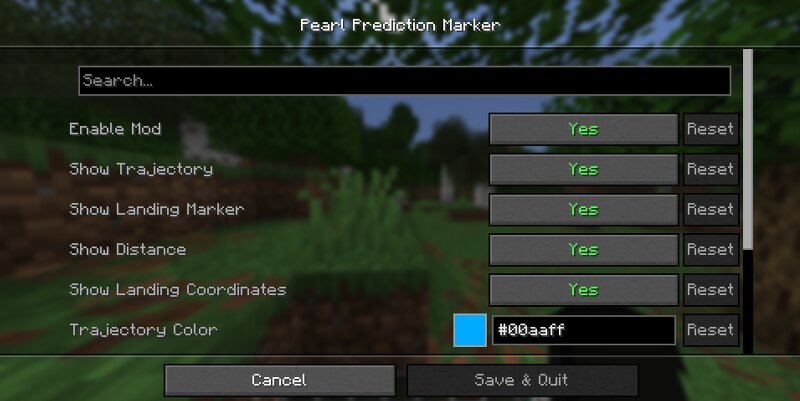
Pearl Prediction Marker is a client-side Fabric mod for Minecraft 1.21.11 that displays a preview of an Ender Pearl's trajectory before it is thrown. The goal is to make practicing pearl throws easier without changing vanilla mechanics. The prediction uses Minecraft's normal projectile physics to render a dotted trajectory and the expected landing position. Everything is calculated locally on the client and the mod does not modify server behavior, making it suitable for multiplayer servers. How to use 1. Install Fabric Loader, Fabric API, Cloth Config and Mod Menu. 2. Launch Minecraft. 3. Hold an Ender Pearl. 4. A trajectory line and landing marker will appear automatically. 5. Open Mod Menu at any time to customize colors, line thickness, maximum prediction distance, and other options. Features • Vanilla-style Ender Pearl trajectory prediction • Landing position marker • Optional distance display • Customizable colors • Adjustable line thickness • Configurable maximum prediction distance • Lightweight client-side rendering • Multiplayer compatible • Fabric 1.21.11 Configuration The mod includes a full Cloth Config menu where you can: • Enable or disable the trajectory • Enable or
Added value
What’s included on this page
Preview, categories, compatibility, and tools on this page — not a bare file mirror.
- Creator
- Dside
- Source
- Minecraft downloads library on Eaglercraft Studio
- Type
- Minecraft mod
- Price
- Free download on Eaglercraft Studio
- Curation
- Listed with credit to Dside · studio preview & install guide
- Game Version
- Minecraft 1.21.11
- Compatible with
- Minecraft Java (match version / loader in facts)
- Tags
- Other, Pearlmod, Pearlpredictionmarker, Pvpmod
Install guide
How to install this free Minecraft mod
Eaglercraft Studio listing with metadata, creator credit, and loader-aware install guidance.
- 1Download the jar/zip when available.
- 2Install the matching loader (Forge, Fabric, or NeoForge) for your Minecraft version.
- 3Drop the mod into your mods folder, then launch with that profile.
Wrong loader or game version usually crashes on startup — read the facts on this page first.
Related free mods
More curated mods from the same library section.

Pastelmooncrafting15 · 67 diamonds · 20 views

PotatoWolfie · 60 diamonds · 2 views

PotatoWolfie · 53 diamonds · 622 views

Janss_33PL · 47 diamonds · 940 views