
PicoMC - optimizes your Minecraft server to run on as little as 512mb RAM.
Creator: TheGamingMahi · 2026-07-12 · Mods · Free on Eaglercraft Studio
Download PicoMC - optimizes your Minecraft server to run on as little as 512mb — free Minecraft mod. Created by TheGamingMahi. Tagged cpu, fast, faster, lessram. Check the file details for Forge, Fabric, or NeoForge before installing.
Creator notes
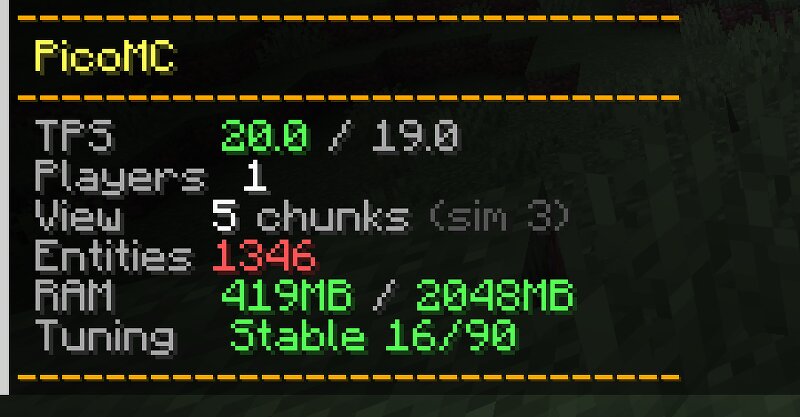
PicoMC Modern Minecraft. Tiny footprint. ⚠️ PicoMC is in early development. Expect bugs, and always back up your server before installing. PicoMC is an optimization plugin built specifically for LeafMC 1.21.11 . It automatically applies hundreds of carefully tuned settings and dynamically manages server resources in real time. The goal is to run modern survival Minecraft on as little as 512mb–1gb RAM for 1–5 players. Other versions may load but won't achieve full performance gains (such as PaperMC, Purpur, or older and newer versions). Still real Minecraft Other projects achieve low hardware usage by rewriting Minecraft from scratch in C or other languages — impressive technically, but you lose everything. No plugins, no mods, no familiar behavior. PicoMC runs on LeafMC which is built on Gale → Purpur → Paper → Spigot → Bukkit. That means: Any Spigot, Paper, or Purpur plugin works alongside PicoMC Vanilla clients connect — no client mods needed Full survival gameplay — nothing gutted, just optimized What's in v1.0.0-beta Automatic Config Optimization On first startup PicoMC backs up all your original configs to a folder in your server root, then replaces them with optimized version
Added value
What’s included on this page
Preview, categories, compatibility, and tools on this page — not a bare file mirror.
- Creator
- TheGamingMahi
- Source
- Minecraft downloads library on Eaglercraft Studio
- Type
- Minecraft mod
- Price
- Free download on Eaglercraft Studio
- Curation
- Listed with credit to TheGamingMahi · studio preview & install guide
- Game Version
- Minecraft 1.21.11
- Compatible with
- Minecraft Java (match version / loader in facts)
- Tags
- Cpu, Fast, Faster, Lessram, Lowram, Optimization
Install guide
How to install this free Minecraft mod
Eaglercraft Studio listing with metadata, creator credit, and loader-aware install guidance.
- 1Download the jar/zip when available.
- 2Install the matching loader (Forge, Fabric, or NeoForge) for your Minecraft version.
- 3Drop the mod into your mods folder, then launch with that profile.
Wrong loader or game version usually crashes on startup — read the facts on this page first.
Related free mods
More curated mods from the same library section.

Pastelmooncrafting15 · 67 diamonds · 20 views

PotatoWolfie · 60 diamonds · 2 views

PotatoWolfie · 53 diamonds · 622 views

Janss_33PL · 47 diamonds · 940 views