
Piglin Trading Menu
Creator: marcsanz-dev · 2026-02-23 · Mods · Free on Eaglercraft Studio
Download Piglin Trading Menu — free Minecraft mod. Created by marcsanz-dev. Tagged functional. Check the file details for Forge, Fabric, or NeoForge before installing.
Creator notes
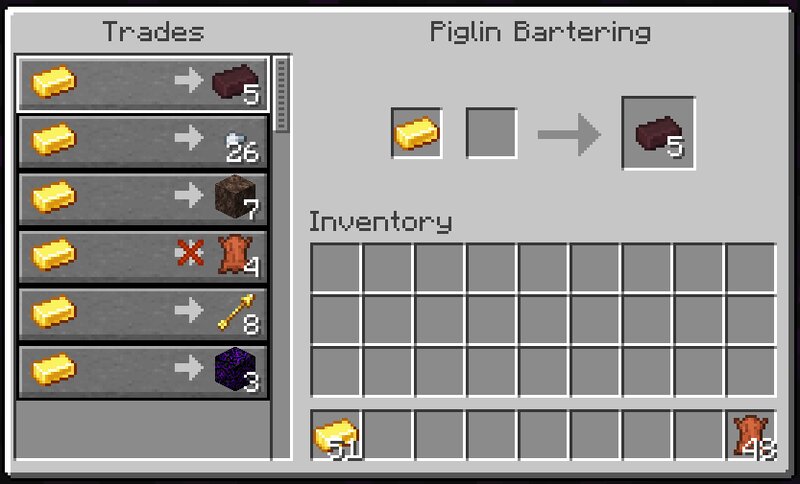
Piglin Trading Menu Tired of throwing gold on the ground and waiting for Piglins to inspect it? Piglin Trading Menu overhauls the vanilla bartering system by introducing a clean, traditional Villager-style trading interface! 🐷✨ Exchange gold directly through a custom GUI. It shows your available items, locked trades when a Piglin is out of stock, and supports quick shift-clicking! 💎 Core Features Instant GUI Trading: Simply right-click any adult Piglin to open the trading menu. You can shift-click massive amounts of gold instantly without waiting for the drop animation or dealing with ghost items! 100% Vanilla Accurate Loot: The trades mirror the exact vanilla bartering loot table and probabilities. Each Piglin gets a unique, seeded set of 6 items they are willing to trade. Smart Restock System: Just like real Villagers, Piglins have a limited stock for each item. Once a trade is locked, you will need to wait half a Minecraft day (10 real-world minutes) for them to restock their inventory automatically. Safe Trading: Are you exploring the Nether without gold armor? No problem! Opening the trading menu will instantly pacify an angry Piglin, freezing them in place while you do busine
Added value
What’s included on this page
Preview, categories, compatibility, and tools on this page — not a bare file mirror.
- Creator
- marcsanz-dev
- Source
- Minecraft downloads library on Eaglercraft Studio
- Type
- Minecraft mod
- Price
- Free download on Eaglercraft Studio
- Curation
- Listed with credit to marcsanz-dev · studio preview & install guide
- Game Version
- Minecraft 1.21.11
- Compatible with
- Minecraft Java (match version / loader in facts)
- Tags
- Functional
Install guide
How to install this free Minecraft mod
Eaglercraft Studio listing with metadata, creator credit, and loader-aware install guidance.
- 1Download the jar/zip when available.
- 2Install the matching loader (Forge, Fabric, or NeoForge) for your Minecraft version.
- 3Drop the mod into your mods folder, then launch with that profile.
Wrong loader or game version usually crashes on startup — read the facts on this page first.
Related free mods
More curated mods from the same library section.

Pastelmooncrafting15 · 67 diamonds · 20 views

PotatoWolfie · 60 diamonds · 2 views

PotatoWolfie · 53 diamonds · 622 views

Janss_33PL · 47 diamonds · 940 views