
Played
Creator: beqare · 2026-04-26 · Mods · Free on Eaglercraft Studio
Download Played — free Minecraft mod. Created by beqare. Tagged functional. Check the file details for Forge, Fabric, or NeoForge before installing.
Creator notes
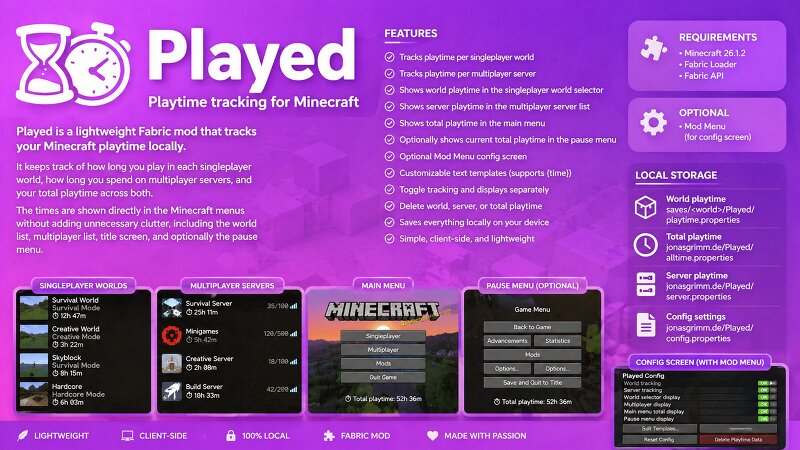
Played is a lightweight Fabric mod that tracks your Minecraft playtime locally. It keeps track of how long you play in each singleplayer world, how long you spend on multiplayer servers, and your total playtime across both. The times are shown directly in the Minecraft menus without adding unnecessary clutter, including the world list, multiplayer list, title screen, and optionally the pause menu. Features Tracks playtime per singleplayer world Tracks playtime per multiplayer server Shows world playtime in the singleplayer world selector Shows server playtime in the multiplayer server list Shows total playtime in the main menu Optionally shows current total playtime in the pause menu Optional Mod Menu config screen Separate customizable text templates for list entries, the main menu, and the pause menu Supports {time} in templates, for example ⏱ {time} , Total playtime: {time} , or Playtime {time} Toggle world tracking, server tracking, and menu displays separately Delete world, server, or total playtime from the config screen Main menu playtime fades in with the vanilla title screen UI Main menu and pause menu text avoid existing bottom-left text when possible Saves everything loc
Added value
What’s included on this page
Preview, categories, compatibility, and tools on this page — not a bare file mirror.
- Creator
- beqare
- Source
- Minecraft downloads library on Eaglercraft Studio
- Type
- Minecraft mod
- Price
- Free download on Eaglercraft Studio
- Curation
- Listed with credit to beqare · studio preview & install guide
- Game Version
- Minecraft 26.1.1
- Compatible with
- Minecraft Java (match version / loader in facts)
- Tags
- Functional
Install guide
How to install this free Minecraft mod
Eaglercraft Studio listing with metadata, creator credit, and loader-aware install guidance.
- 1Download the jar/zip when available.
- 2Install the matching loader (Forge, Fabric, or NeoForge) for your Minecraft version.
- 3Drop the mod into your mods folder, then launch with that profile.
Wrong loader or game version usually crashes on startup — read the facts on this page first.
Related free mods
More curated mods from the same library section.

Pastelmooncrafting15 · 67 diamonds · 20 views

PotatoWolfie · 60 diamonds · 2 views

PotatoWolfie · 53 diamonds · 622 views

Janss_33PL · 47 diamonds · 940 views