
Player Highlighter
Creator: lyuwenhan · 2026-04-22 · Mods · Free on Eaglercraft Studio
Download Player Highlighter — free Minecraft mod. Created by lyuwenhan. Tagged functional, social, utility. Check the file details for Forge, Fabric, or NeoForge before installing.
Creator notes
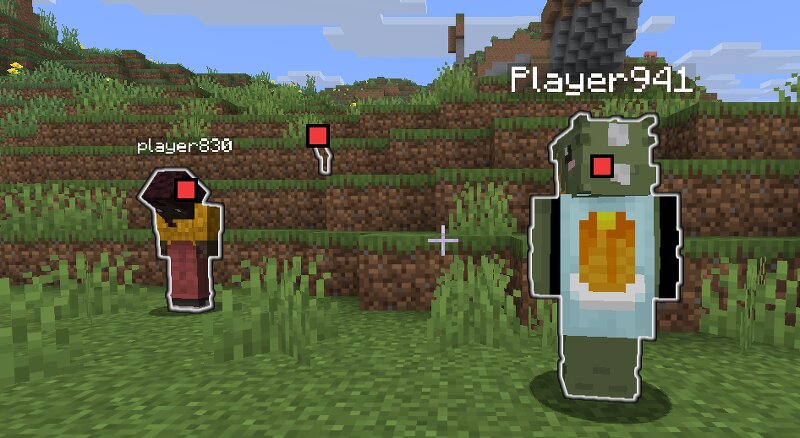
Languages EN/English | ZH-CN/简体中文 Player Highlighter A client-side Fabric mod that improves player awareness with glowing outlines, on-screen target icons, and a nearby-player information HUD. Overview Player Highlighter makes other players easier to locate and track without requiring any server-side installation. The mod provides three visual features: A glowing outline around other players Small target icons displayed over visible players A HUD list showing nearby player information Glowing outlines and target icons appear while the configured hold key is pressed or while keep mode is enabled. The player information HUD remains available independently. All features are handled entirely on the client. Key Features Highlights other players with a glowing outline Displays target icons over players currently visible on screen Shows nearby player information in a HUD Shows player name, relative direction, distance, health, and coordinates Supports a hold key for temporary highlighting Supports toggleable keep mode for persistent highlighting Supports a client command for showing or hiding the player information HUD Highlight Controls Highlighting is active when either of the following
Added value
What’s included on this page
Preview, categories, compatibility, and tools on this page — not a bare file mirror.
- Creator
- lyuwenhan
- Source
- Minecraft downloads library on Eaglercraft Studio
- Type
- Minecraft mod
- Price
- Free download on Eaglercraft Studio
- Curation
- Listed with credit to lyuwenhan · studio preview & install guide
- Game Version
- Minecraft 26.3 snapshot
- Compatible with
- Minecraft Java (match version / loader in facts)
- Tags
- Functional, Social, Utility
Install guide
How to install this free Minecraft mod
Eaglercraft Studio listing with metadata, creator credit, and loader-aware install guidance.
- 1Download the jar/zip when available.
- 2Install the matching loader (Forge, Fabric, or NeoForge) for your Minecraft version.
- 3Drop the mod into your mods folder, then launch with that profile.
Wrong loader or game version usually crashes on startup — read the facts on this page first.
Related free mods
More curated mods from the same library section.

Pastelmooncrafting15 · 67 diamonds · 20 views

PotatoWolfie · 60 diamonds · 2 views

PotatoWolfie · 53 diamonds · 622 views

Janss_33PL · 47 diamonds · 940 views