
Player Mannequins
Creator: RedCarlie · 2026-09-16 · Mods · Free on Eaglercraft Studio
Download Player Mannequins — free Minecraft mod. Created by RedCarlie. Tagged block, book, custom, customisable. Check the file details for Forge, Fabric, or NeoForge before installing.
Creator notes
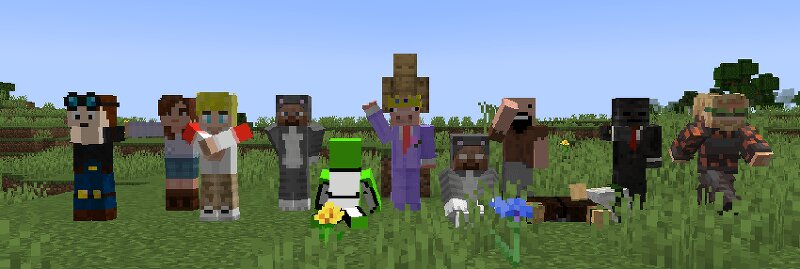
Carlie's Mannequins I felt that commands to change a player head into the skin of a real player was an interesting concept in the game that I used to wish would be explored more. So I created this! Wether for Decoration, Memes, Builds, whatever! These mannequins will take the skin of whatever player you type into the Username Box and with a toggleable Nameplate and Pedestal (aswell as custom poses to allow for a larger range of builds). All done with a home-made notebook style gui to give it all that more personality! This has been a passion project of mine for weeks! I hope you like it! ✨ Features 🎭 Display any Minecraft player's skin 📖 Immersive notebook GUI for easy customisation 🧍 Collection of unique poses 🔄 Live rotateable preview while editing 🏷️ Toggleable Nameplate 🪵 Toggleable Pedestal 🎨 Supports both Steve and Alex (Slim) player models 🎭 Included Poses Standing Saluting Hands Behind Back Arms Crossed Relaxed Sitting Meditating Family Guy Death Pose Waving Pointing Aiming Running T-Pose ⚔️Equipment Inventory Full Equipment page with added Hotbar to customise your Mannequin with Armour and Weapons! Toggle a player's Cape on and off if they have one equipped. Modded and Van
Added value
What’s included on this page
Preview, categories, compatibility, and tools on this page — not a bare file mirror.
- Creator
- RedCarlie
- Source
- Minecraft downloads library on Eaglercraft Studio
- Type
- Minecraft mod
- Price
- Free download on Eaglercraft Studio
- Curation
- Listed with credit to RedCarlie · studio preview & install guide
- Game Version
- Minecraft 1.20.1
- Compatible with
- Minecraft Java (match version / loader in facts)
- Tags
- Block, Book, Custom, Customisable, Decoration, Functional
Install guide
How to install this free Minecraft mod
Eaglercraft Studio listing with metadata, creator credit, and loader-aware install guidance.
- 1Download the jar/zip when available.
- 2Install the matching loader (Forge, Fabric, or NeoForge) for your Minecraft version.
- 3Drop the mod into your mods folder, then launch with that profile.
Wrong loader or game version usually crashes on startup — read the facts on this page first.
Related free mods
More curated mods from the same library section.

Pastelmooncrafting15 · 67 diamonds · 20 views

PotatoWolfie · 60 diamonds · 2 views

PotatoWolfie · 53 diamonds · 622 views

Janss_33PL · 47 diamonds · 940 views