
Player Trading
Creator: Aidanamite · 2026-03-30 · Mods · Free on Eaglercraft Studio
Download Player Trading — free Minecraft mod. Created by Aidanamite. Tagged functional, multiplayer, simple, trading. Check the file details for Forge, Fabric, or NeoForge before installing.
Creator notes
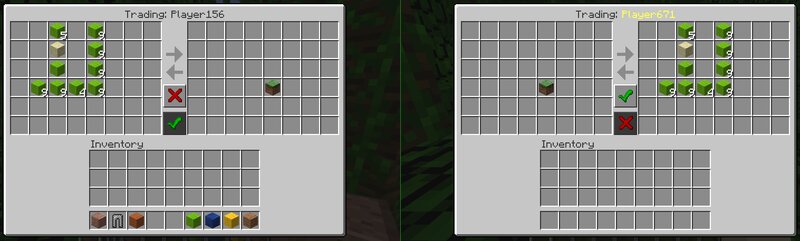
This is little mod I decided to throw together that just adds a simple UI for players to trade with eachother. Adds 3 commands: /trade <player> - Sends/accepts a trade request to a player /tradecancel <player> - Cancels a sent trade request to a player /forcetrade <player> - [Requires OP] Opens the trade UI with a specific player, this one skips sending a request Each player can only put in and take out items from the left side of the trade window, neither player can take items from the right-side, where it shows what the other player is sending, and the items will not be traded until both players have clicked the "ready" button in the middle (you can also click it again to "unready"). If you've clicked the ready button and the other player changes the items on their side of the trade, you will be changed to unready, so people can't just change the deal just before clicking ready. If either player closes the UI, the trade will be canceled and any items still in the trading section of the UI will be returned to the respective player's inventory. When someone sends you a trade request, you'll see a message in chat like: PlayerNameHere has requested to trade with you. Accept? and you
Added value
What’s included on this page
Preview, categories, compatibility, and tools on this page — not a bare file mirror.
- Creator
- Aidanamite
- Source
- Minecraft downloads library on Eaglercraft Studio
- Type
- Minecraft mod
- Price
- Free download on Eaglercraft Studio
- Curation
- Listed with credit to Aidanamite · studio preview & install guide
- Game Version
- Minecraft 1.12.2
- Compatible with
- Minecraft Java (match version / loader in facts)
- Tags
- Functional, Multiplayer, Simple, Trading
Install guide
How to install this free Minecraft mod
Eaglercraft Studio listing with metadata, creator credit, and loader-aware install guidance.
- 1Download the jar/zip when available.
- 2Install the matching loader (Forge, Fabric, or NeoForge) for your Minecraft version.
- 3Drop the mod into your mods folder, then launch with that profile.
Wrong loader or game version usually crashes on startup — read the facts on this page first.
Related free mods
More curated mods from the same library section.

Pastelmooncrafting15 · 67 diamonds · 20 views

PotatoWolfie · 60 diamonds · 2 views

PotatoWolfie · 53 diamonds · 622 views

Janss_33PL · 47 diamonds · 940 views