
players tracker add-on "better than locator bar"
Creator: shadowGem100k · 2026-04-19 · Mods · Free on Eaglercraft Studio
Download players tracker add-on "better than locator bar" — free Minecraft mod. Created by shadowGem100k. Tagged addon, mode, other, players. Check the file details for Forge, Fabric, or NeoForge before installing.
Creator notes
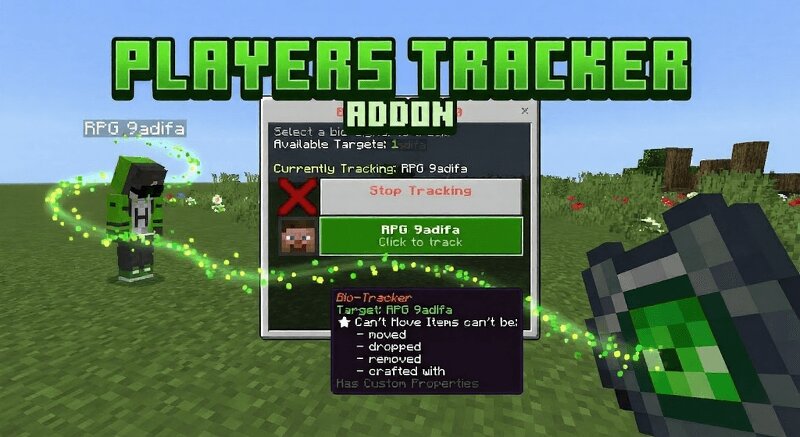
📡 Bio-Tracker Addon Advanced Player Tracking System for Minecraft Bedrock 1.21+ Bio-Tracker Addon is a high tech Minecraft Bedrock utility addon that introduces a smart tracking device capable of locating and monitoring other players in real time. By using a special Bio-Tracker item, players can lock onto a target’s bio signal and receive live directional guidance, distance readouts, movement status, and environmental context directly on the action bar. This addon is designed for survival, SMP, and roleplay servers where tracking, hunting, or teamwork is part of gameplay. If you are looking for a Minecraft Bedrock player tracker addon, GPS style compass mod, bounty hunter system, or survival tracking utility, Bio-Tracker Addon provides an immersive and balanced solution without commands or cheats. 🧠 What This Bio-Tracker Addon Does Players use a Bio-Tracker item to open a menu and select a nearby or online player to track. Once locked, the tracker continuously updates the target’s position in real time. Directional arrows show where to go relative to your facing direction. Distance is displayed in meters or kilometers depending on range. Vertical difference arrows show whether the
Added value
What’s included on this page
Preview, categories, compatibility, and tools on this page — not a bare file mirror.
- Creator
- shadowGem100k
- Source
- Minecraft downloads library on Eaglercraft Studio
- Type
- Minecraft mod
- Price
- Free download on Eaglercraft Studio
- Curation
- Listed with credit to shadowGem100k · studio preview & install guide
- Game Version
- Minecraft 26.1.1
- Compatible with
- Minecraft Java (match version / loader in facts)
- Tags
- Addon, Mode, Other, Players, Survival, Tool
Install guide
How to install this free Minecraft mod
Eaglercraft Studio listing with metadata, creator credit, and loader-aware install guidance.
- 1Download the jar/zip when available.
- 2Install the matching loader (Forge, Fabric, or NeoForge) for your Minecraft version.
- 3Drop the mod into your mods folder, then launch with that profile.
Wrong loader or game version usually crashes on startup — read the facts on this page first.
Related free mods
More curated mods from the same library section.

Pastelmooncrafting15 · 67 diamonds · 20 views

PotatoWolfie · 60 diamonds · 2 views

PotatoWolfie · 53 diamonds · 622 views

Janss_33PL · 47 diamonds · 940 views