
Ponytime (Server Plugin) - Free Download
Creator: Hope · 2025-12-21 · Mods · Free on Eaglercraft Studio
Download Ponytime (Server Plugin) - Free Download — free Minecraft mod. Created by Hope. Tagged server. Check the file details for Forge, Fabric, or NeoForge before installing.
Creator notes
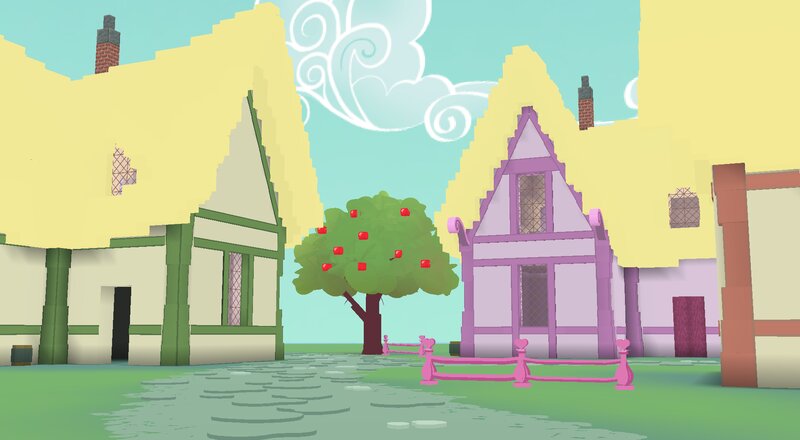
A Minecraft Java Edition plugin inspired by ponies. Made for Paper servers. ⋆✴︎˚。⋆ Includes ⋆✴︎˚。⋆ • The main plugin • Custom resource pack • A building utility plugin • Example server setup (+ example world save) • Usage guide ⋆✴︎˚。⋆ About Ponytime ⋆✴︎˚。⋆ The Ponytime plugin adds player classes and abilities (telekinesis, flight), custom-colored horns, wings or magic auras, custom advancements (requires UltimateAdvancementAPI), and more. The resource pack adds a number of custom models and attempts to give Minecraft a vibrant, 2D cartoon look. No mods are required. Players joining your server only need the resource pack, which can be set to download automatically. Some client-side mods may improve the experience (OptiBoxes for custom skybox textures, Sodium...) The project is not made for singleplayer , though you can still use the example server setup to play it by yourself. The main difference is you would be joining through the Multiplayer menu instead of joining a singleplayer world. Lastly, please note some features are experimental and the plugin is not considered ready for big, public servers. Some vanilla mechanics are also unavailable (XP bar, redstone, anything relying o
Added value
What’s included on this page
Preview, categories, compatibility, and tools on this page — not a bare file mirror.
- Creator
- Hope
- Source
- Minecraft downloads library on Eaglercraft Studio
- Type
- Minecraft mod
- Price
- Free download on Eaglercraft Studio
- Curation
- Listed with credit to Hope · studio preview & install guide
- Game Version
- Minecraft 1.21.8
- Compatible with
- Minecraft Java (match version / loader in facts)
- Tags
- Server
Install guide
How to install this free Minecraft mod
Eaglercraft Studio listing with metadata, creator credit, and loader-aware install guidance.
- 1Download the jar/zip when available.
- 2Install the matching loader (Forge, Fabric, or NeoForge) for your Minecraft version.
- 3Drop the mod into your mods folder, then launch with that profile.
Wrong loader or game version usually crashes on startup — read the facts on this page first.
Related free mods
More curated mods from the same library section.

Pastelmooncrafting15 · 67 diamonds · 20 views

PotatoWolfie · 60 diamonds · 2 views

PotatoWolfie · 53 diamonds · 622 views

Janss_33PL · 47 diamonds · 940 views