
Poopmod
Creator: doctorcocacola · 2026-02-28 · Mods · Free on Eaglercraft Studio
Download Poopmod — free Minecraft mod. Created by doctorcocacola. Tagged afghanistan, big, cool, cursed. Check the file details for Forge, Fabric, or NeoForge before installing.
Creator notes
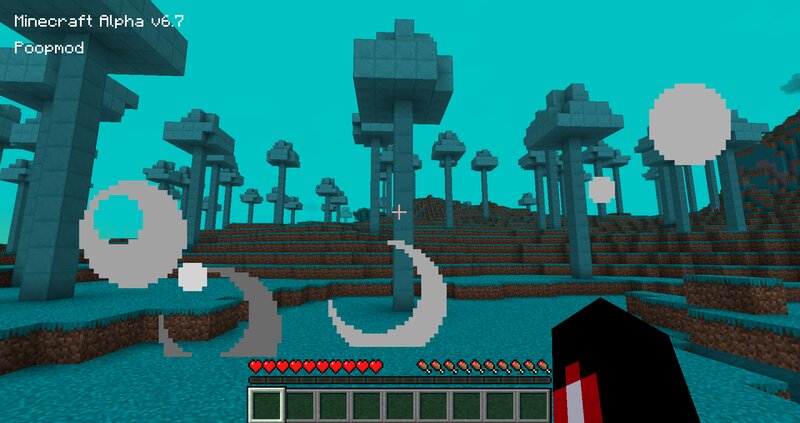
!SHORT DESCRIPTION! a mod that adds everything you could imagine, inspired by ItsJim. It even adds belarus and bosnia !SPOILERS! If you want to see the full mod with your own eyes, download and play it. Long form description: this is actually a VERY VERY huge mod it contains everything from blocks and items to mobs and biomes and dimensions. will upload screenshots later me on discord @doctorcocacola although im gonna be very very very VERY rare on discord you can still message me to try to say something! Im not an experienced mod maker and this is my first mod so dont hate on me This mod may have some sensitive stuff and I made it for my friends for laughs so PLEASE DO NOT TAKE THIS MOD SERIOUSLY!!! I SWEAR TO GOD DO NOT TAKE THIS MOD SERIOUSLY AT ALL COST!! List of things ( sorry for bad wording i wrote that in a hurry for modrinth but i cant publish it fsr ) : Biomes: Colgate, Tangerine, Belarus, Vietnam, Afghanistan, Mexico, Taiwan and some more national biomes, TNT Biome (Removed) and probably 1 more that i forgot to mention Items: Gummies, Grenades, Mendoza SMG, Glock 17 Gen 5, AT4, Chainsaw (almost unused), Sniper, Tangerines, Guest Baseball Cap, Semechki, Bread Plant, Bread
Added value
What’s included on this page
Preview, categories, compatibility, and tools on this page — not a bare file mirror.
- Creator
- doctorcocacola
- Source
- Minecraft downloads library on Eaglercraft Studio
- Type
- Minecraft mod
- Price
- Free download on Eaglercraft Studio
- Curation
- Listed with credit to doctorcocacola · studio preview & install guide
- Game Version
- Minecraft 1.20.1
- Compatible with
- Minecraft Java (match version / loader in facts)
- Tags
- Afghanistan, Big, Cool, Cursed, Fun, Funny
Install guide
How to install this free Minecraft mod
Eaglercraft Studio listing with metadata, creator credit, and loader-aware install guidance.
- 1Download the jar/zip when available.
- 2Install the matching loader (Forge, Fabric, or NeoForge) for your Minecraft version.
- 3Drop the mod into your mods folder, then launch with that profile.
Wrong loader or game version usually crashes on startup — read the facts on this page first.
Related free mods
More curated mods from the same library section.

Pastelmooncrafting15 · 67 diamonds · 20 views

PotatoWolfie · 60 diamonds · 2 views

PotatoWolfie · 53 diamonds · 622 views

Janss_33PL · 47 diamonds · 940 views