
Project404.jar
Creator: TheKrakenName · 2026-06-21 · Mods · Free on Eaglercraft Studio
Download Project404.jar — free Minecraft mod. Created by TheKrakenName. Tagged adventureandrpg, dimensions, horror, mobs. Check the file details for Forge, Fabric, or NeoForge before installing.
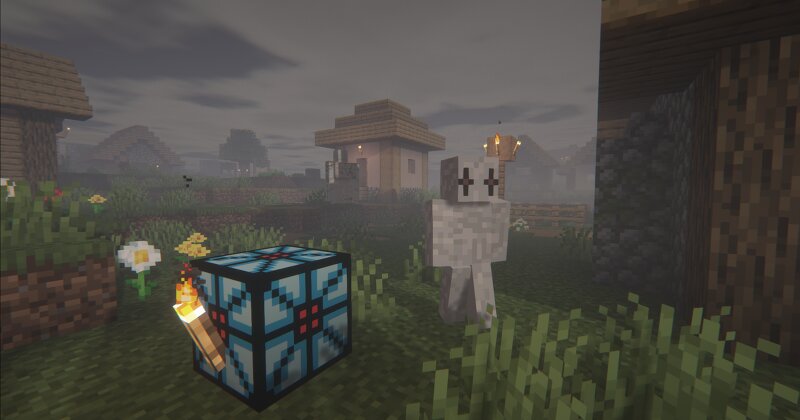
Creator notes
📁 What is it? Project404.jar is a file retrieved from the hard drive of Ivan , a young developer found dead in his own basement. Investigators never managed to explain the circumstances of his death, but they discovered this JAR in his workspace. When they tried to copy it, the file began to chaotically rewrite its own code. It was leaked online. Now it's in your hands. 📺 Официальный трейлер 🔍 What's inside After loading the mod, you spawn into a normal Minecraft world. The first few days seem ordinary. But with each new in‑game day, strange things start to happen: ✉️ Messages appear in chat from a player who isn't on the list. 🔊 Sometimes you hear footsteps, laughter, or whispers. 👤 A figure may stalk you, disappearing the moment you look at it. 📦 Some items in your inventory change their names. 🌌 Anomalies appear in the sky. These aren't random bugs. They are part of the script. What else is hidden inside remains unknown – the investigators were never able to fully analyse the file. You will be the one to explore it. 📖 Story and progression You will have to survive several in‑game days. Events unfold gradually, with each new day revealing the next piece of the story. You will mee
Added value
What’s included on this page
Preview, categories, compatibility, and tools on this page — not a bare file mirror.
- Creator
- TheKrakenName
- Source
- Minecraft downloads library on Eaglercraft Studio
- Type
- Minecraft mod
- Price
- Free download on Eaglercraft Studio
- Curation
- Listed with credit to TheKrakenName · studio preview & install guide
- Game Version
- Minecraft 1.20.1
- Compatible with
- Minecraft Java (match version / loader in facts)
- Tags
- Adventureandrpg, Dimensions, Horror, Mobs, Other, Structures
Install guide
How to install this free Minecraft mod
Eaglercraft Studio listing with metadata, creator credit, and loader-aware install guidance.
- 1Download the jar/zip when available.
- 2Install the matching loader (Forge, Fabric, or NeoForge) for your Minecraft version.
- 3Drop the mod into your mods folder, then launch with that profile.
Wrong loader or game version usually crashes on startup — read the facts on this page first.
Related free mods
More curated mods from the same library section.

Pastelmooncrafting15 · 67 diamonds · 20 views

PotatoWolfie · 60 diamonds · 2 views

PotatoWolfie · 53 diamonds · 622 views

Janss_33PL · 47 diamonds · 940 views