
Quality of My Life (NeoForge)
Creator: Hardmuscle · 2026-09-28 · Mods · Free on Eaglercraft Studio
Download Quality of My Life (NeoForge) — free Minecraft mod. Created by Hardmuscle. Tagged functional. Check the file details for Forge, Fabric, or NeoForge before installing.
Creator notes
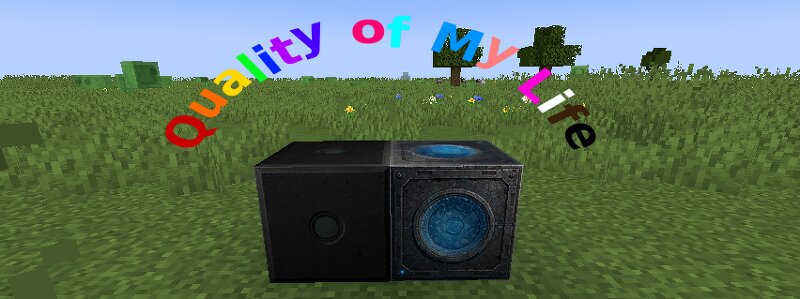
Make your Minecraft life a little easier with Quality of My Life — a pair of practical utility blocks designed to simplify everyday tasks! This mod introduces two useful blocks: the Clock Block , a compact, lever-controlled redstone clock, and the Rain Detector , which automatically detects and clears rain. Both blocks feature custom crafting recipes, making them easy to incorporate into your world. Features Clock Block A compact, single-block redstone clock that produces continuous redstone pulses. Generates a continuous redstone pulse. Can be switched on and off using a lever. Features a custom black industrial design with a glowing green indicator. Replaces the need for a larger redstone clock circuit. Doubles as a beacon modifier: place it directly on top of a beacon to turn the beam purple. Rain Detector A convenient utility block that detects and clears rain. Automatically detects when it is raining. Clears the rain and sends a gentle confirmation message. Can be placed anywhere in your world, including hidden locations. Features a custom technical design with a glowing blue center. Doubles as a beacon modifier: place it directly on top of a beacon to turn the beam purple. Re
Added value
What’s included on this page
Preview, categories, compatibility, and tools on this page — not a bare file mirror.
- Creator
- Hardmuscle
- Source
- Minecraft downloads library on Eaglercraft Studio
- Type
- Minecraft mod
- Price
- Free download on Eaglercraft Studio
- Curation
- Listed with credit to Hardmuscle · studio preview & install guide
- Game Version
- Minecraft 1.21.1
- Compatible with
- Minecraft Java (match version / loader in facts)
- Tags
- Functional
Install guide
How to install this free Minecraft mod
Eaglercraft Studio listing with metadata, creator credit, and loader-aware install guidance.
- 1Download the jar/zip when available.
- 2Install the matching loader (Forge, Fabric, or NeoForge) for your Minecraft version.
- 3Drop the mod into your mods folder, then launch with that profile.
Wrong loader or game version usually crashes on startup — read the facts on this page first.
Related free mods
More curated mods from the same library section.

Pastelmooncrafting15 · 67 diamonds · 20 views

PotatoWolfie · 60 diamonds · 2 views

PotatoWolfie · 53 diamonds · 622 views

Janss_33PL · 47 diamonds · 940 views