
Quenchy Cactus
Creator: Water_Wind_ · 2026-07-04 · Mods · Free on Eaglercraft Studio
Download Quenchy Cactus — free Minecraft mod. Created by Water_Wind_. Tagged atla, cacti, cactus, juice. Check the file details for Forge, Fabric, or NeoForge before installing.
Creator notes
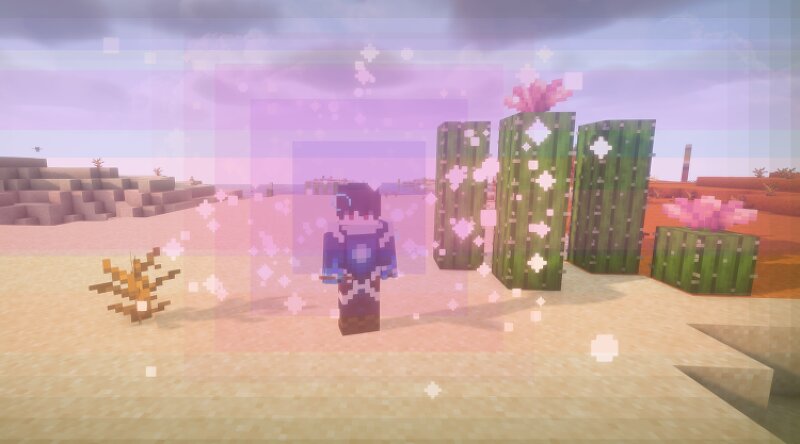
It it not recommended to use this mod if you have epilepsy. Flashing Lights. Cactus Juice How to Get Cactus Juice Craft it : Put 1 Cactus + 1 Bowl in a crafting table. Or just right-click a cactus with an empty bowl. Eat it for a quick 30-second buzz and some buffs. How to Brew Cactus Potions Use a Brewing Stand: Potion What to Add Duration Cactus Juice Potion Awkward Potion + Cactus 3 min Extended Cactus Juice Potion + Redstone 8 min Mind-Melting Cactus Juice Potion + Glowstone Dust 3 min Splash version : Add Gunpowder to any potion. Lingering version : Add Dragon's Breath to a splash potion. What the Potions Do All potions give you buffs: Night Vision, Speed, Strength, Jump Boost, Haste, Regeneration, Slow Falling, and Dolphin's Grace. Your screen gets a rainbow overlay — shifting colors, pulsing rings, and flowing patterns. It's vivid but you can still see and play through it unless you brew the cactus into the mind-melting potion! The Mind-Melting Potion This one's different. When you drink it, you get an 8-second trip: your screen goes dark and erupts with spinning kaleidoscope patterns, fractal stars collapsing inward, geometric shapes folding toward center, and a hyperspace
Added value
What’s included on this page
Preview, categories, compatibility, and tools on this page — not a bare file mirror.
- Creator
- Water_Wind_
- Source
- Minecraft downloads library on Eaglercraft Studio
- Type
- Minecraft mod
- Price
- Free download on Eaglercraft Studio
- Curation
- Listed with credit to Water_Wind_ · studio preview & install guide
- Game Version
- Minecraft 26.2
- Compatible with
- Minecraft Java (match version / loader in facts)
- Tags
- Atla, Cacti, Cactus, Juice, New Content, Psychedelic
Install guide
How to install this free Minecraft mod
Eaglercraft Studio listing with metadata, creator credit, and loader-aware install guidance.
- 1Download the jar/zip when available.
- 2Install the matching loader (Forge, Fabric, or NeoForge) for your Minecraft version.
- 3Drop the mod into your mods folder, then launch with that profile.
Wrong loader or game version usually crashes on startup — read the facts on this page first.
Related free mods
More curated mods from the same library section.

Pastelmooncrafting15 · 67 diamonds · 20 views

PotatoWolfie · 60 diamonds · 2 views

PotatoWolfie · 53 diamonds · 622 views

Janss_33PL · 47 diamonds · 940 views