
Ragdoll Corpse Cleaner
Creator: takapii_kun0717 · 2026-09-11 · Mods · Free on Eaglercraft Studio
Download Ragdoll Corpse Cleaner — free Minecraft mod. Created by takapii_kun0717. Tagged other. Check the file details for Forge, Fabric, or NeoForge before installing.
Creator notes
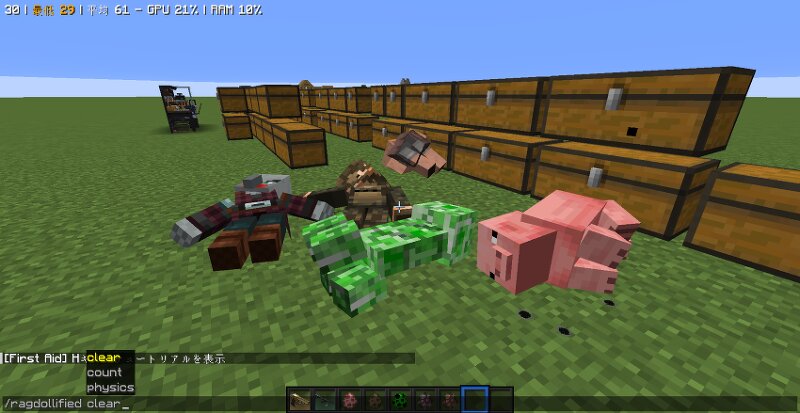
English Ragdoll Corpse Cleaner A lightweight add-on MOD for Ragdollified. You can now delete all ragdolled mob corpses with a single command. This is useful when you want to reset the corpse in a mini-game. Features /ragdollified clear— instantly removes all active ragdoll corpses on the server /ragdollified count — shows how many ragdoll corpses are currently active Built entirely on Ragdollified's official public API (RagdollifiedApi), so it won't interfere with physics, syncing, or rendering 1.5.0~ /ragdollified countcorpse—Displays the number of currently active player corpses /ragdollified clearcorpse — instantly removes all player corpses on the server Requirements Minecraft 1.20.1 Forge 47.4.10+ Ragdollified (required — this is an addon, not a standalone mod) Ragdollified Player Corpses Notes Commands require permission level 2 (operator) by default The deletion process runs exclusively on the server side. Since ragdoll coordinate data depends on client-side physics calculations, the system does not currently support range-based deletion—such as “delete only within a radius of X blocks”—and only supports “delete all.” Not affiliated with the Ragdollified author; built indepe
Added value
What’s included on this page
Preview, categories, compatibility, and tools on this page — not a bare file mirror.
- Creator
- takapii_kun0717
- Source
- Minecraft downloads library on Eaglercraft Studio
- Type
- Minecraft mod
- Price
- Free download on Eaglercraft Studio
- Curation
- Listed with credit to takapii_kun0717 · studio preview & install guide
- Game Version
- Minecraft 1.20.1
- Compatible with
- Minecraft Java (match version / loader in facts)
- Tags
- Other
Install guide
How to install this free Minecraft mod
Eaglercraft Studio listing with metadata, creator credit, and loader-aware install guidance.
- 1Download the jar/zip when available.
- 2Install the matching loader (Forge, Fabric, or NeoForge) for your Minecraft version.
- 3Drop the mod into your mods folder, then launch with that profile.
Wrong loader or game version usually crashes on startup — read the facts on this page first.
Related free mods
More curated mods from the same library section.

Pastelmooncrafting15 · 67 diamonds · 20 views

PotatoWolfie · 60 diamonds · 2 views

PotatoWolfie · 53 diamonds · 622 views

Janss_33PL · 47 diamonds · 940 views