
Rainbow Health Bar (animated) - Fabric 1.21.9
Creator: Dani_Drawz · 2025-12-20 · Mods · Free on Eaglercraft Studio
Download Rainbow Health Bar (animated) - Fabric 1.21.9 — free Minecraft mod. Created by Dani_Drawz. Tagged aesthetic, animation, client, custom. Check the file details for Forge, Fabric, or NeoForge before installing.
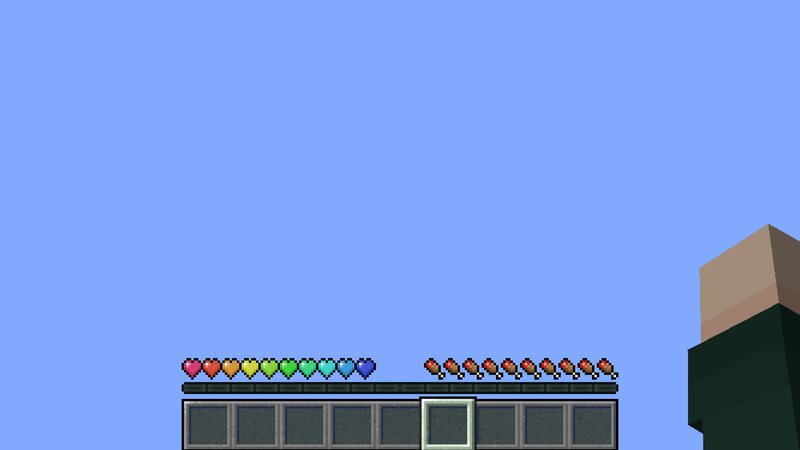
Creator notes
I have searched for a way to have each of the hearts above the hotbar a different color and didn't find any mod with that functionality. After a deeper search for custom health bar bods, I have come across " Simple Health Bar (Forge/Fabric) " by Lanfix8 , which was the perfect starting point for what I had in mind. Just needed some tweaking to achieve what I had in mind. You can find the mod that this is based on here: www.curseforge.com/minecraft/mc-mods/simple-health-bar With consent by the creator of the original mod, I have modified the mod's code, which now adds rainbow hearts and more. Features: R a i n b o w health bar mode Rainbow hearts with/without a speed-adjustable animation (Here's a video, showing what it looks like: https://youtu.be/nzGW1NYw1Uo ) Custom color mode Set a default color for all of the hearts Unchanged mode There is no color applied to the hearts. It will just show the default texture for the hearts (which you could change via your own resource pack, more on that below) Health Indicator Text Text, which shows your current HP with custom color, positioning and alignment (left/right) options Textures for Absorption hearts, poison hearts, wither hearts and
Added value
What’s included on this page
Preview, categories, compatibility, and tools on this page — not a bare file mirror.
- Creator
- Dani_Drawz
- Source
- Minecraft downloads library on Eaglercraft Studio
- Type
- Minecraft mod
- Price
- Free download on Eaglercraft Studio
- Curation
- Listed with credit to Dani_Drawz · studio preview & install guide
- Game Version
- Minecraft 1.21.9
- Compatible with
- Minecraft Java (match version / loader in facts)
- Tags
- Aesthetic, Animation, Client, Custom, Fabric, Healthbar
Install guide
How to install this free Minecraft mod
Eaglercraft Studio listing with metadata, creator credit, and loader-aware install guidance.
- 1Download the jar/zip when available.
- 2Install the matching loader (Forge, Fabric, or NeoForge) for your Minecraft version.
- 3Drop the mod into your mods folder, then launch with that profile.
Wrong loader or game version usually crashes on startup — read the facts on this page first.
Related free mods
More curated mods from the same library section.

Pastelmooncrafting15 · 67 diamonds · 20 views

PotatoWolfie · 60 diamonds · 2 views

PotatoWolfie · 53 diamonds · 622 views

Janss_33PL · 47 diamonds · 940 views