
Realistic Mechanics - Vanilla+ Physics
Creator: marcsanz-dev · 2026-03-18 · Mods · Free on Eaglercraft Studio
Download Realistic Mechanics - Vanilla+ Physics — free Minecraft mod. Created by marcsanz-dev. Tagged other. Check the file details for Forge, Fabric, or NeoForge before installing.
Creator notes
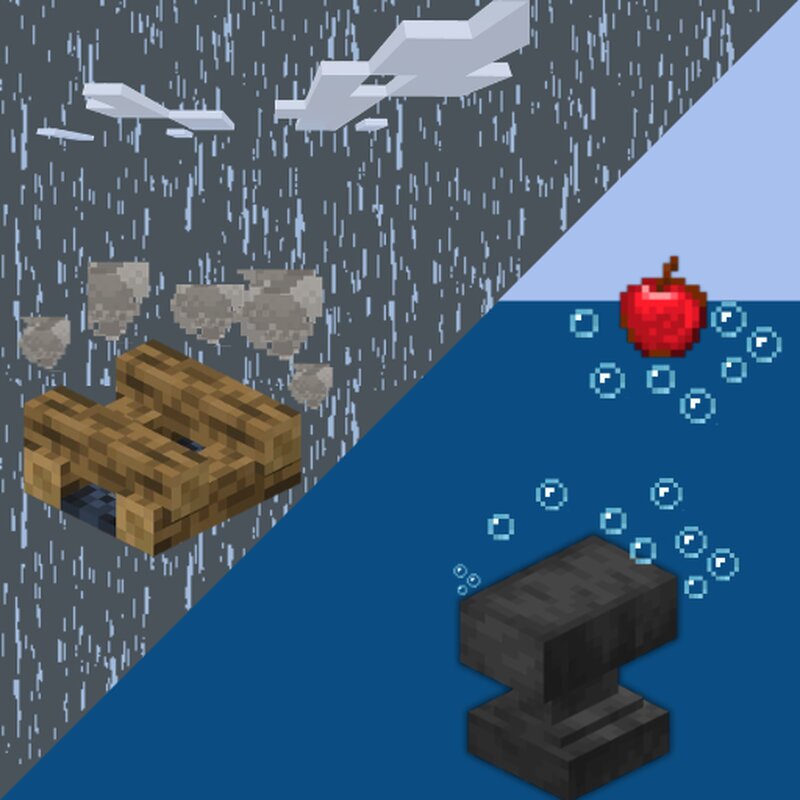
Realistic Mechanics Overview Have you ever wondered why a heavy iron anvil floats on water just like a wooden block? Or why an uncovered campfire stays perfectly lit during a massive thunderstorm? Realistic Mechanics is a Vanilla+ mod designed to fix these logical gaps and breathe life into your world. By introducing immersive, physics-based, and environmental interactions, this mod transforms the way you experience survival Minecraft. Every new feature has been carefully crafted to feel like it should have always been in the base game, offering intuitive solutions and dynamic reactions to the world around you. 🌟 Physics and Environment The world is no longer static. Elements now interact with each other in logical and visually satisfying ways. Heavy Items Sink Say goodbye to floating ores and armors. Dense blocks, heavy tools, and metallic items will now sink straight to the bottom of water and lava lakes. ⚓ Dynamic Weather Reactions You will need to build roofs for your outdoor campsites. When it starts raining, exposed campfires and candles will naturally sizzle and extinguish. 🌧️ Cushioning Falls Parkour just got a little more strategic. Landing on soft materials like any type
Added value
What’s included on this page
Preview, categories, compatibility, and tools on this page — not a bare file mirror.
- Creator
- marcsanz-dev
- Source
- Minecraft downloads library on Eaglercraft Studio
- Type
- Minecraft mod
- Price
- Free download on Eaglercraft Studio
- Curation
- Listed with credit to marcsanz-dev · studio preview & install guide
- Game Version
- Minecraft 1.21.11
- Compatible with
- Minecraft Java (match version / loader in facts)
- Tags
- Other
Install guide
How to install this free Minecraft mod
Eaglercraft Studio listing with metadata, creator credit, and loader-aware install guidance.
- 1Download the jar/zip when available.
- 2Install the matching loader (Forge, Fabric, or NeoForge) for your Minecraft version.
- 3Drop the mod into your mods folder, then launch with that profile.
Wrong loader or game version usually crashes on startup — read the facts on this page first.
Related free mods
More curated mods from the same library section.

Pastelmooncrafting15 · 67 diamonds · 20 views

PotatoWolfie · 60 diamonds · 2 views

PotatoWolfie · 53 diamonds · 622 views

Janss_33PL · 47 diamonds · 940 views