
Recipe Conflict Resolver
Creator: Aquarius_playz · 2026-05-29 · Mods · Free on Eaglercraft Studio
Download Recipe Conflict Resolver — free Minecraft mod. Created by Aquarius_playz. Tagged functional. Check the file details for Forge, Fabric, or NeoForge before installing.
Creator notes
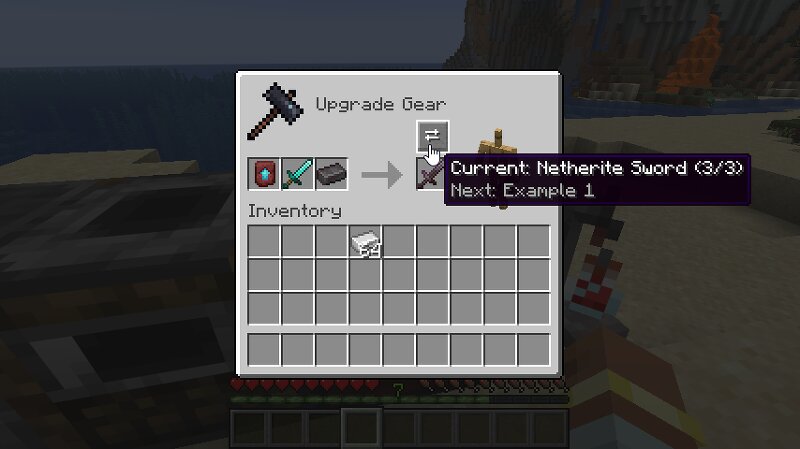
Aquarius Libs needs to be installed for this mod to work! Tired of recipe conflicts when multiple mods share the exact same crafting ingredients? This mod adds a simple button to easily cycle through conflicting outputs and get the exact item you need. (Its also kinda like a library mod as my future item mods will need it most likely, because of the recipe conflicts) What It Does Conflict Button: If two mods use the same recipe, a button pops up right next to the item output box. Click to Swap: Just click the button or the output box to cycle through the different item results. Handy Tooltips: Hover over the button to see your current choice (like 1/3) and see exactly what item is coming up next. Where It Works: Works perfectly in Crafting Tables, Player Inventories, and Smithing Tables. Furnace Support: It also works in Furnaces, Blast Furnaces, and Smokers (though fixing the underlying mod conflicts is recommended for smelting). Supported Versions Loaders: Forge, Fabric, and NeoForge. Versions: 26.1.x Note: No plans to support older versions below 26.1 for now! Found a Bug? If you encounter any bugs or experience a crash , please send the crash log directly to me via curseforge p
Added value
What’s included on this page
Preview, categories, compatibility, and tools on this page — not a bare file mirror.
- Creator
- Aquarius_playz
- Source
- Minecraft downloads library on Eaglercraft Studio
- Type
- Minecraft mod
- Price
- Free download on Eaglercraft Studio
- Curation
- Listed with credit to Aquarius_playz · studio preview & install guide
- Game Version
- Minecraft 26.1.2
- Compatible with
- Minecraft Java (match version / loader in facts)
- Tags
- Functional
Install guide
How to install this free Minecraft mod
Eaglercraft Studio listing with metadata, creator credit, and loader-aware install guidance.
- 1Download the jar/zip when available.
- 2Install the matching loader (Forge, Fabric, or NeoForge) for your Minecraft version.
- 3Drop the mod into your mods folder, then launch with that profile.
Wrong loader or game version usually crashes on startup — read the facts on this page first.
Related free mods
More curated mods from the same library section.

Pastelmooncrafting15 · 67 diamonds · 20 views

PotatoWolfie · 60 diamonds · 2 views

PotatoWolfie · 53 diamonds · 622 views

Janss_33PL · 47 diamonds · 940 views