
ROCSA – Lexicon Constructs v1.0
Creator: Rey_Onigiri · 2026-02-18 · Mods · Free on Eaglercraft Studio
Download ROCSA – Lexicon Constructs v1.0 — free Minecraft mod. Created by Rey_Onigiri. Tagged bedrock, bedrockedition, functional, gui. Check the file details for Forge, Fabric, or NeoForge before installing.
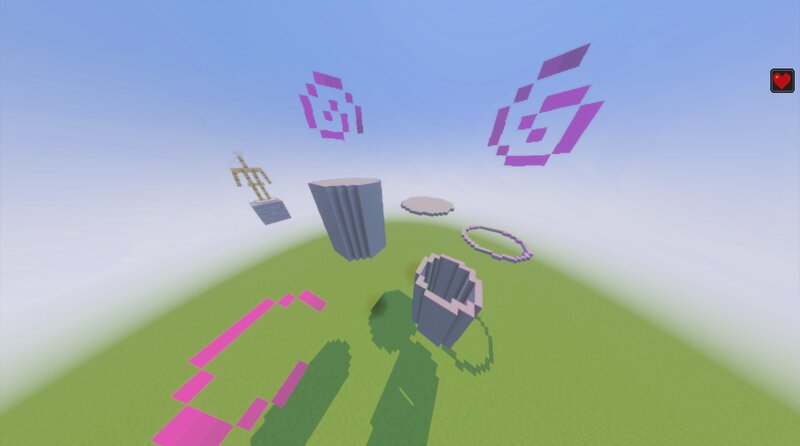
Creator notes
ROCSA – Lexicon Constructs v1.0 Lexicon Constructs is a modular command-based system deployed through a placement block available in Creative mode. When the block is placed, a GUI appears with two options: - ROCSA – Lexicon Constructs → Places and activates the 3x2x3 system structure. - Undo → Safely removes and deactivates the system if it has already been installed. Once activated, players can generate predefined structures and effect zones by naming armor stands with specific keywords. Each named armor stand acts as a construct node, automatically creating the corresponding structure or functional area. Available Keywords Structure Constructs platform → Generates a circular stone platform. ring → Generates a stone ring. cylinder → Generates a solid stone cylinder. cylinderh → Generates a hollow stone cylinder. Effect Zones heal → Creates an accelerated regeneration area. jump → Creates a jump boost area. speed → Creates a speed boost area. nopvp → Creates an anti-PvP zone. Lexicon Constructs is lightweight, modular, and easy to integrate into any world. To completely disable the system, simply place the deployment block again and select Undo . Version 1.0 – Initial release. Crea
Added value
What’s included on this page
Preview, categories, compatibility, and tools on this page — not a bare file mirror.
- Creator
- Rey_Onigiri
- Source
- Minecraft downloads library on Eaglercraft Studio
- Type
- Minecraft mod
- Price
- Free download on Eaglercraft Studio
- Curation
- Listed with credit to Rey_Onigiri · studio preview & install guide
- Game Version
- Minecraft 1.21.11
- Compatible with
- Minecraft Java (match version / loader in facts)
- Tags
- Bedrock, Bedrockedition, Functional, Gui, Minecraftbedrock, Serverutility
Install guide
How to install this free Minecraft mod
Eaglercraft Studio listing with metadata, creator credit, and loader-aware install guidance.
- 1Download the jar/zip when available.
- 2Install the matching loader (Forge, Fabric, or NeoForge) for your Minecraft version.
- 3Drop the mod into your mods folder, then launch with that profile.
Wrong loader or game version usually crashes on startup — read the facts on this page first.
Related free mods
More curated mods from the same library section.

Pastelmooncrafting15 · 67 diamonds · 20 views

PotatoWolfie · 60 diamonds · 2 views

PotatoWolfie · 53 diamonds · 622 views

Janss_33PL · 47 diamonds · 940 views