
Ropeworks Mod
Creator: xElandriax · 2026-02-16 · Mods · Free on Eaglercraft Studio
Download Ropeworks Mod — free Minecraft mod. Created by xElandriax. Tagged aesthetic, bunting, chains, decoration. Check the file details for Forge, Fabric, or NeoForge before installing.
Creator notes
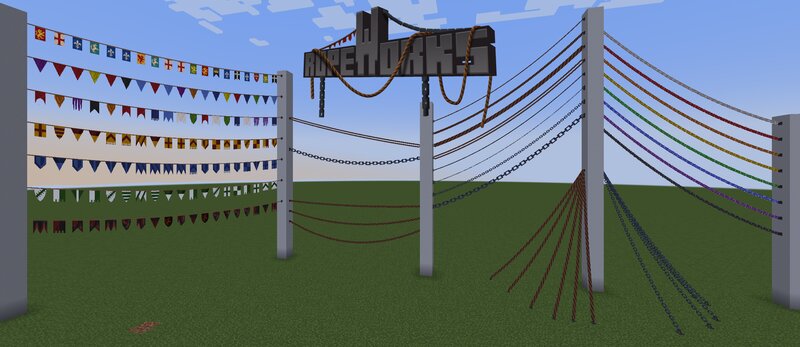
Ropeworks is designed to augment builds with additional detailing and comes initially with 4 thicknesses of Rope Anchors 3 thicknesses of Chain Anchors 1 Cable Anchor 1 Tinsel Anchor (9 colours) 1 Bunting Anchor (7 sets) Chains, rope and cable can be tightened with their sag modifier shift+right click with the rope tool on their origin anchor Tinsel can be recoloured by right-clicking with an open hand on the origin anchor Bunting sets can be changed by shift+right clicking with the rope tool on their origin anchor Anchors of all types can be placed on any block face and will remain if the block behind them is removed, giving greater options for creativity. Multiple ropes/chains, etc., can be linked to 1 anchor. ROPEWORKS IS AN ENTITY-BASED MOD. Please bear this in mind when adding entities to your builds; they can and will cause lag if you place too many in a relatively small area! SURVIVAL - anchors and the rope tool can be crafted on the stonecutter in survival BUG REPORTING - Please report any issues you find. Textures are 32x32, mod is currently in beta. Must be added to both client and server. Currently available for fabric 1.20.1 and fabric 1.21.1 on CurseForge and Modrinth
Added value
What’s included on this page
Preview, categories, compatibility, and tools on this page — not a bare file mirror.
- Creator
- xElandriax
- Source
- Minecraft downloads library on Eaglercraft Studio
- Type
- Minecraft mod
- Price
- Free download on Eaglercraft Studio
- Curation
- Listed with credit to xElandriax · studio preview & install guide
- Game Version
- Minecraft 1.20.1
- Compatible with
- Minecraft Java (match version / loader in facts)
- Tags
- Aesthetic, Bunting, Chains, Decoration, Mod, Ropes
Install guide
How to install this free Minecraft mod
Eaglercraft Studio listing with metadata, creator credit, and loader-aware install guidance.
- 1Download the jar/zip when available.
- 2Install the matching loader (Forge, Fabric, or NeoForge) for your Minecraft version.
- 3Drop the mod into your mods folder, then launch with that profile.
Wrong loader or game version usually crashes on startup — read the facts on this page first.
Related free mods
More curated mods from the same library section.

Pastelmooncrafting15 · 67 diamonds · 20 views

PotatoWolfie · 60 diamonds · 2 views

PotatoWolfie · 53 diamonds · 622 views

Janss_33PL · 47 diamonds · 940 views