
Esmeraldas Arcoíris / Rainbow emeralds (Java)
Creator: HiperEduard · 2026-05-02 · Mods · Free on Eaglercraft Studio
Download Esmeraldas Arcoíris / Rainbow emeralds (Java) — free Minecraft mod. Created by HiperEduard. Tagged aesthetic, awesome, best, block. Check the file details for Forge, Fabric, or NeoForge before installing.
Creator notes
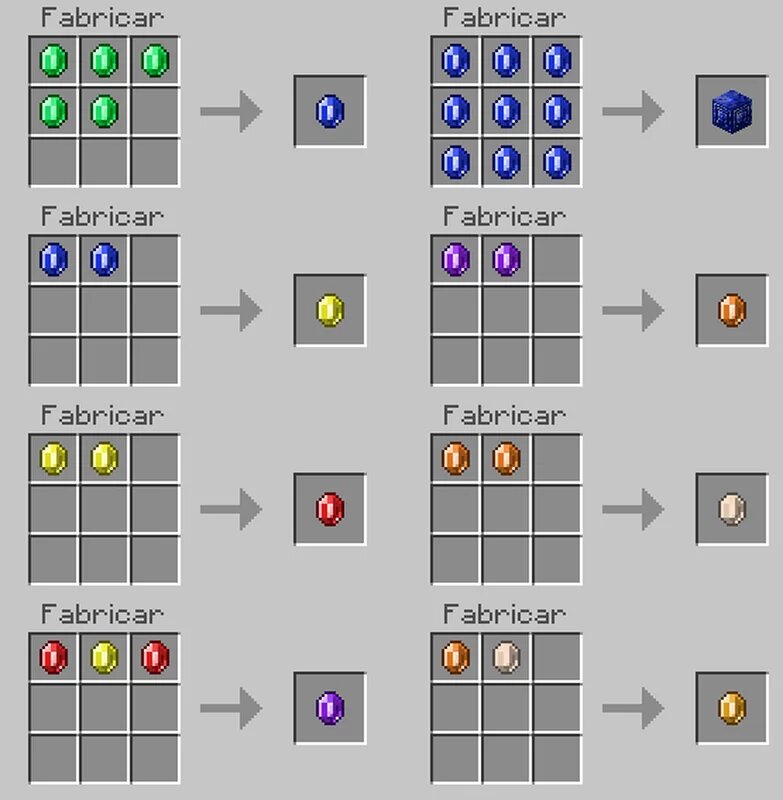
Si quieres apoyar mi trabajo , puedes hacerlo vía PayPal en este enlace: https://paypal.me/supportEdu928 . Solo necesitas tu cuenta PayPal o crear una gratis. Versión: 1.0.0, versión de Fabric: 0.18.4 Con este addon, podrás craftear esmeraldas con colores y valores varios (y a partir de ellas puedes obtener esmeraldas): Esmeralda azul (5 esmeraldas) Esmeralda amarilla (10 esmeraldas) Esmeralda roja (20 esmeraldas) Esmeralda morada (50 esmeraldas) Esmeralda naranja (100 esmeraldas) Esmeralda plateada (200 esmeraldas) Esmeralda dorada (300 esmeraldas) Así mismo, podrás crear bloques con ellas, así como los bloques de esmeralda. If you'd like to support my work , you can do so via PayPal at this link: https://paypal.me/supportEdu928 . You just need your PayPal account or you can create one for free. Version: 1.0.0, Fabric version: 0.18.4 With this addon, you will be able to craft emeralds with colors and various values (and starting from them, you can obtain emeralds): Blue emerald (5 emeralds) Yellow emerald (10 emeralds) Red emerald (20 emeralds) Purple emerald (50 emeralds) Orange emerald (100 emeralds) Silver emerald (200 emeralds) Gold emerald (300 emeralds) Additionally, you wil
Added value
What’s included on this page
Preview, categories, compatibility, and tools on this page — not a bare file mirror.
- Creator
- HiperEduard
- Source
- Minecraft downloads library on Eaglercraft Studio
- Type
- Minecraft mod
- Price
- Free download on Eaglercraft Studio
- Curation
- Listed with credit to HiperEduard · studio preview & install guide
- Game Version
- Minecraft 1.21.11
- Compatible with
- Minecraft Java (match version / loader in facts)
- Tags
- Aesthetic, Awesome, Best, Block, Content, Cool
Install guide
How to install this free Minecraft mod
Eaglercraft Studio listing with metadata, creator credit, and loader-aware install guidance.
- 1Download the jar/zip when available.
- 2Install the matching loader (Forge, Fabric, or NeoForge) for your Minecraft version.
- 3Drop the mod into your mods folder, then launch with that profile.
Wrong loader or game version usually crashes on startup — read the facts on this page first.
Related free mods
More curated mods from the same library section.

Pastelmooncrafting15 · 67 diamonds · 20 views

PotatoWolfie · 60 diamonds · 2 views

PotatoWolfie · 53 diamonds · 622 views

Janss_33PL · 47 diamonds · 940 views