
Sacred Settlements
Creator: Bleepz · 2025-11-26 · Mods · Free on Eaglercraft Studio
Download Sacred Settlements — free Minecraft mod. Created by Bleepz. Tagged other. Check the file details for Forge, Fabric, or NeoForge before installing.
Creator notes
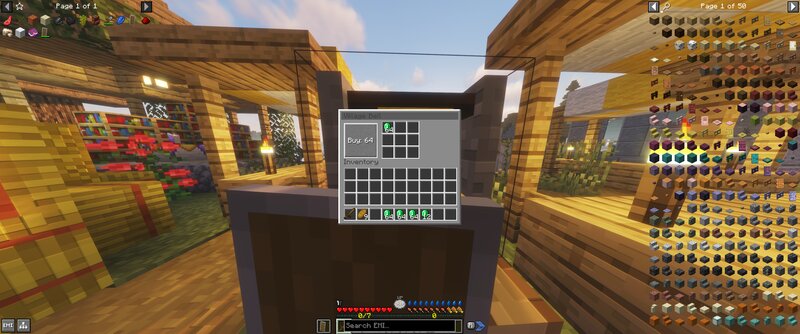
Sacred Settlements (Neoforge 21.1.215) - Claim villages. Protect your territory. Pay to maintain it. A territory control mod that lets players claim villages via their bells. Configurable protection radius keeps your builds safe—as long as you keep the treasury funded. Core Systems: - Village Claiming - Interact with a village bell to purchase ownership. Cost is configurable (default: 64 emeralds). Claimed villages get a protection radius around the bell that prevents other players from breaking/placing blocks. (For chest protection I suggest looking at my other mod "Frontier Stats" which locks chests and fits nicely with this mod. Lootr also still works and most village overhauls are compatible as long as they produce the bell.) - Treasury System - Protection isn't permanent. The village treasury depletes over time and must be restocked with emeralds. Let it run dry and you lose the claim. Other players can then buy it out from under you. - Configurable Protection - Server admins control the radius size and costs via config files. - Villagers Are Safe - Your villagers and iron golems cannot be damaged The Trade-off: You get safety, but you have to earn it. Villages become investme
Added value
What’s included on this page
Preview, categories, compatibility, and tools on this page — not a bare file mirror.
- Creator
- Bleepz
- Source
- Minecraft downloads library on Eaglercraft Studio
- Type
- Minecraft mod
- Price
- Free download on Eaglercraft Studio
- Curation
- Listed with credit to Bleepz · studio preview & install guide
- Game Version
- Minecraft 1.21.1
- Compatible with
- Minecraft Java (match version / loader in facts)
- Tags
- Other
Install guide
How to install this free Minecraft mod
Eaglercraft Studio listing with metadata, creator credit, and loader-aware install guidance.
- 1Download the jar/zip when available.
- 2Install the matching loader (Forge, Fabric, or NeoForge) for your Minecraft version.
- 3Drop the mod into your mods folder, then launch with that profile.
Wrong loader or game version usually crashes on startup — read the facts on this page first.
Related free mods
More curated mods from the same library section.

Pastelmooncrafting15 · 67 diamonds · 20 views

PotatoWolfie · 60 diamonds · 2 views

PotatoWolfie · 53 diamonds · 622 views

Janss_33PL · 47 diamonds · 940 views