
Server Helper (v3.7.1)
Creator: petstorebuffet · 2026-02-09 · Mods · Free on Eaglercraft Studio
Download Server Helper (v3.7.1) — free Minecraft mod. Created by petstorebuffet. Tagged customization, discordcommunity, moderation, other. Check the file details for Forge, Fabric, or NeoForge before installing.
Creator notes
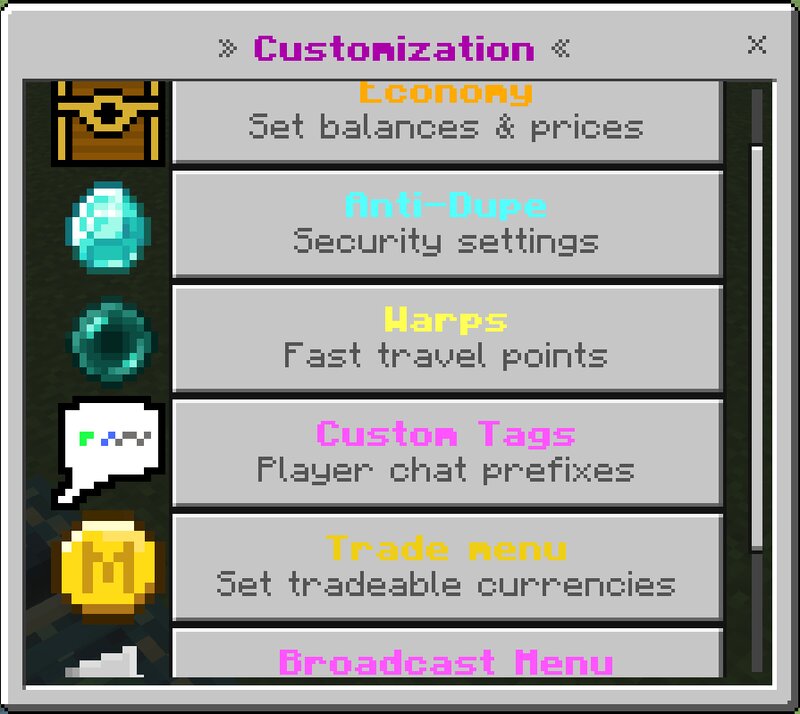
Features: Moderation: Inventory viewer Ender Chest viewer Freeze System Mute system Ban/unban system even offline Spy — lets you view global player data or watch what players are doing while being invisible to tracers. Item Ban Basic warning systems, anti-fly, anti-kill aura, high cps, and excessive items protections (toggleable) Anti Bundle Dupe (toggleable) Customization: Home System Set the default language; players can also set a personal language (English, Spanish, Portuguese). Warp System Broadcast system Disable specific entities from spawning Toggles for the End, Nether Custom chat tag system Customizable settings Admin Land Claim Hologram system (text or leaderboards and also is /kill proof) Toggle wither spawning Custom Items: Miner Helmet, Farmer Boots, Sell Wand, Auto Hoe World Border (toggleable) (adjustable) Item NameTags (toggleable) (invisible behind walls) Random teleport (toggleable) (adjustable) Customizable Crate System (toggleable) Anti-Combat Log (toggleable) Player Land Claim (toggleable) TPA system (toggleable) Economy system (toggleable) World Entity Item Clearer (toggleable) Bounty System (toggleable) Stackable Mobs (toggleable) Rank next to name (toggleab
Added value
What’s included on this page
Preview, categories, compatibility, and tools on this page — not a bare file mirror.
- Creator
- petstorebuffet
- Source
- Minecraft downloads library on Eaglercraft Studio
- Type
- Minecraft mod
- Price
- Free download on Eaglercraft Studio
- Curation
- Listed with credit to petstorebuffet · studio preview & install guide
- Game Version
- Minecraft 1.21.11
- Compatible with
- Minecraft Java (match version / loader in facts)
- Tags
- Customization, Discordcommunity, Moderation, Other, Realm, Semivanilla
Install guide
How to install this free Minecraft mod
Eaglercraft Studio listing with metadata, creator credit, and loader-aware install guidance.
- 1Download the jar/zip when available.
- 2Install the matching loader (Forge, Fabric, or NeoForge) for your Minecraft version.
- 3Drop the mod into your mods folder, then launch with that profile.
Wrong loader or game version usually crashes on startup — read the facts on this page first.
Related free mods
More curated mods from the same library section.

Pastelmooncrafting15 · 67 diamonds · 20 views

PotatoWolfie · 60 diamonds · 2 views

PotatoWolfie · 53 diamonds · 622 views

Janss_33PL · 47 diamonds · 940 views