
Show Chest Name
Creator: Aquarius_playz · 2026-06-07 · Mods · Free on Eaglercraft Studio
Download Show Chest Name — free Minecraft mod. Created by Aquarius_playz. Tagged functional. Check the file details for Forge, Fabric, or NeoForge before installing.
Creator notes
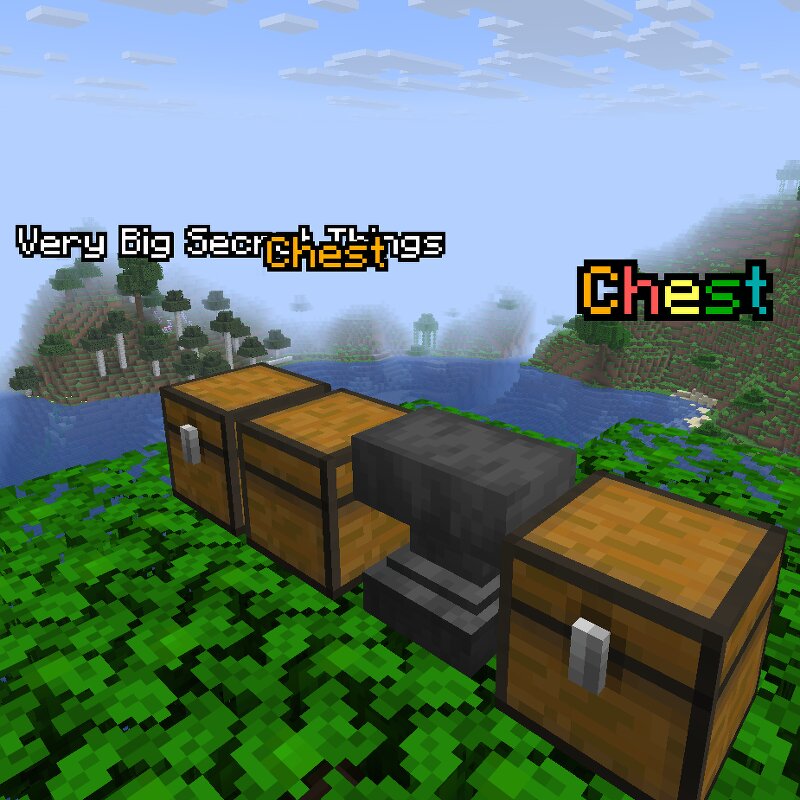
Aquarius Libs needs to be installed for this mod to work! In vanilla Minecraft, renaming a chest at an anvil only displays its custom name inside the container's menu. This mod brings those names to life by rendering them as visible name tags directly above your chests. What it does: Visual Name Tags: Displays custom chest names in the world. Color Code Support: Use § formatting codes for unique, vibrant names (in the anvil when naming). Sneak Transparency: Text becomes transparent when you sneak to keep your view clear. Config Options: Tweak the config file to customize the background and outline colors(example: -16777216) (only one can be used), or change the display mode to see through(to see the names through blocks). Supported Versions Loaders: Forge, Fabric, and NeoForge. Versions: 26.1.x Note: No plans to support older versions below 26.1 for now Found a Bug? If you encounter any bugs or experience a crash , please send the crash log directly to me via private message so I can look into it.
Added value
What’s included on this page
Preview, categories, compatibility, and tools on this page — not a bare file mirror.
- Creator
- Aquarius_playz
- Source
- Minecraft downloads library on Eaglercraft Studio
- Type
- Minecraft mod
- Price
- Free download on Eaglercraft Studio
- Curation
- Listed with credit to Aquarius_playz · studio preview & install guide
- Game Version
- Minecraft 26.1.2
- Compatible with
- Minecraft Java (match version / loader in facts)
- Tags
- Functional
Install guide
How to install this free Minecraft mod
Eaglercraft Studio listing with metadata, creator credit, and loader-aware install guidance.
- 1Download the jar/zip when available.
- 2Install the matching loader (Forge, Fabric, or NeoForge) for your Minecraft version.
- 3Drop the mod into your mods folder, then launch with that profile.
Wrong loader or game version usually crashes on startup — read the facts on this page first.
Related free mods
More curated mods from the same library section.

Pastelmooncrafting15 · 67 diamonds · 20 views

PotatoWolfie · 60 diamonds · 2 views

PotatoWolfie · 53 diamonds · 622 views

Janss_33PL · 47 diamonds · 940 views