
SkinBlink
Creator: RealNamanYT · 2026-06-25 · Mods · Free on Eaglercraft Studio
Download SkinBlink — free Minecraft mod. Created by RealNamanYT. Tagged bedrock, blink, eyeblink, mod. Check the file details for Forge, Fabric, or NeoForge before installing.
Creator notes
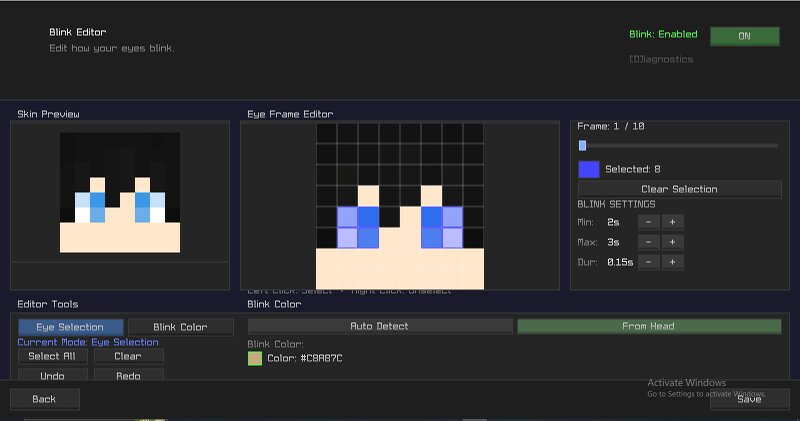
SkinBlink - Custom Blinking Animations for Minecraft Skins Ever felt like Minecraft skins look too static? SkinBlink is a client-side Fabric mod that adds customizable blinking animations to your Minecraft character. Select your eye pixels, choose a blink color directly from your skin, and make your character feel more alive during gameplay, cinematics, screenshots, roleplay, and Replay Mod recordings. Features Custom blinking animations Eye pixel selection editor Blink color selection from your skin In-game editor GUI Head preview and editing canvas Adjustable blink timing Save and load configurations Replay Mod friendly Works in singleplayer and multiplayer Client-side only How To Use Open the SkinBlink editor. Select the pixels that represent your eyes. Choose a blink color from your skin. Save your settings. Enable blinking. Enjoy a more realistic Minecraft character. Compatibility Supported: Minecraft 1.21.11 Fabric Loader Singleplayer Multiplayer servers Premium Minecraft skins Custom launcher skins Current Limitations: Default offline Steve skins are not supported. Default offline Alex skins are not supported. Official Minecraft skins may not work correctly in offline/cracke
Added value
What’s included on this page
Preview, categories, compatibility, and tools on this page — not a bare file mirror.
- Creator
- RealNamanYT
- Source
- Minecraft downloads library on Eaglercraft Studio
- Type
- Minecraft mod
- Price
- Free download on Eaglercraft Studio
- Curation
- Listed with credit to RealNamanYT · studio preview & install guide
- Game Version
- Minecraft 26.1.2
- Compatible with
- Minecraft Java (match version / loader in facts)
- Tags
- Bedrock, Blink, Eyeblink, Mod, Other, Skin
Install guide
How to install this free Minecraft mod
Eaglercraft Studio listing with metadata, creator credit, and loader-aware install guidance.
- 1Download the jar/zip when available.
- 2Install the matching loader (Forge, Fabric, or NeoForge) for your Minecraft version.
- 3Drop the mod into your mods folder, then launch with that profile.
Wrong loader or game version usually crashes on startup — read the facts on this page first.
Related free mods
More curated mods from the same library section.

Pastelmooncrafting15 · 67 diamonds · 20 views

PotatoWolfie · 60 diamonds · 2 views

PotatoWolfie · 53 diamonds · 622 views

Janss_33PL · 47 diamonds · 940 views