
Smart BackPacks
Creator: SmartStreamLabs · 2026-04-19 · Mods · Free on Eaglercraft Studio
Download Smart BackPacks — free Minecraft mod. Created by SmartStreamLabs. Tagged automation, energy fluid and itemtransport, new content, storage. Check the file details for Forge, Fabric, or NeoForge before installing.
Creator notes
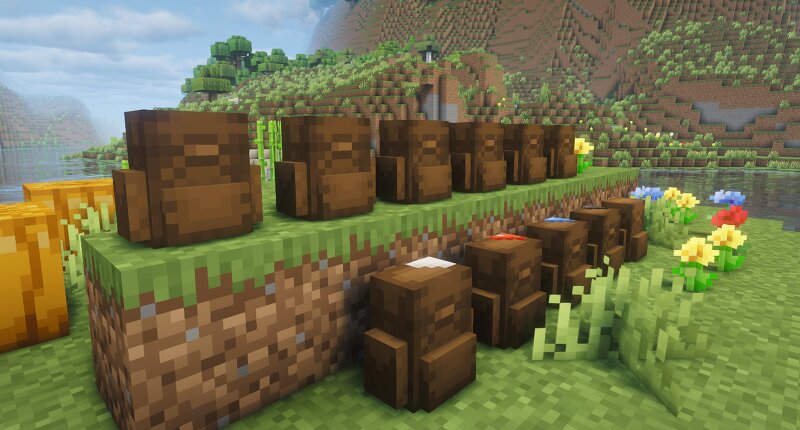
📦Smart Backpacks Smart Backpacks adds upgradeable portable storage backpacks to Minecraft, giving you a flexible inventory system that can grow from simple early-game storage into advanced automation, fluid, energy, and utility setups. Each backpack has its own internal inventory, can be placed in the world, worn on your back, opened remotely with the right upgrades, and expanded with a large set of upgrade modules. SOON ON MODRINTH! ⚙️Features Multiple backpack tiers with increasing storage - Wearable backpacks - Placeable backpacks - Upgrade system with many utility, automation, machine, and storage upgrades - Optional Curios support for backpack slot integration - Fluid storage and transfer support - FE energy storage support - Remote access, chunk loading, lighting, soulbound storage, and more - Large stack-size expansion upgrades - Automation support for items, fluids, and containers View the wiki page for all information: SmartBackpacks Wiki 🔍Backpack Tiers Smart Backpacks includes multiple material-based backpack tiers, such as: Leather Backpack — 9 slots Coal Backpack — 18 slots Lapis Lazuli Backpack — 27 slots Redstone Backpack — 36 slots Quartz Backpack — 45 slots Copper
Added value
What’s included on this page
Preview, categories, compatibility, and tools on this page — not a bare file mirror.
- Creator
- SmartStreamLabs
- Source
- Minecraft downloads library on Eaglercraft Studio
- Type
- Minecraft mod
- Price
- Free download on Eaglercraft Studio
- Curation
- Listed with credit to SmartStreamLabs · studio preview & install guide
- Game Version
- Minecraft 1.20.1
- Compatible with
- Minecraft Java (match version / loader in facts)
- Tags
- Automation, Energy Fluid And Itemtransport, New Content, Storage
Install guide
How to install this free Minecraft mod
Eaglercraft Studio listing with metadata, creator credit, and loader-aware install guidance.
- 1Download the jar/zip when available.
- 2Install the matching loader (Forge, Fabric, or NeoForge) for your Minecraft version.
- 3Drop the mod into your mods folder, then launch with that profile.
Wrong loader or game version usually crashes on startup — read the facts on this page first.
Related free mods
More curated mods from the same library section.

Pastelmooncrafting15 · 67 diamonds · 20 views

PotatoWolfie · 60 diamonds · 2 views

PotatoWolfie · 53 diamonds · 622 views

Janss_33PL · 47 diamonds · 940 views