
Sniffer Expanded
Creator: OprolbareBadkuip · 2026-06-12 · Mods · Free on Eaglercraft Studio
Download Sniffer Expanded — free Minecraft mod. Created by OprolbareBadkuip. Tagged armor, boss, custom, expanded. Check the file details for Forge, Fabric, or NeoForge before installing.
Creator notes
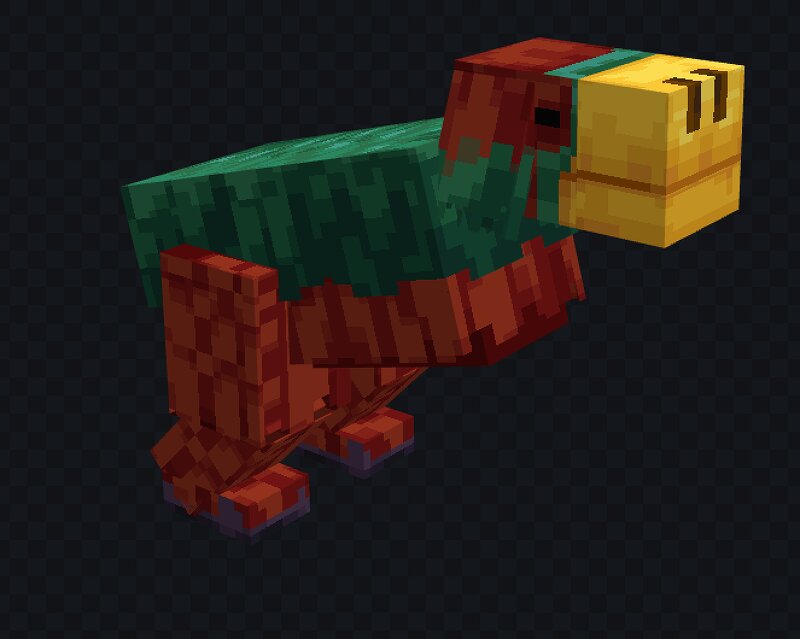
Sniffers Expanded aims to do exactly what its name suggests: expand upon the Sniffer and unlock its true potential. The Sniffer is one of the few mobs in Minecraft that currently has very limited functionality, often causing players to view it as somewhat "underwhelming" or even useless. That’s exactly what inspired this project. We set out to give the Sniffer a meaningful role in gameplay by adding new mechanics, progression, and content centered entirely around this unique mob. With Sniffers Expanded, the Sniffer becomes the centerpiece of an entirely new gameplay loop. Features included in the mod: New Wood Type(s) A brand-new wood set to build with (starting with one in the first release, with more planned). New recources A few new type of rescources like leather, ingots and more will be coming! Enhanced Sniffers New variants of Sniffers that are capable of digging up special and valuable resources, such as unique dust. Sniffer-themed Mini Boss A challenging new encounter built around the Sniffer’s lore and theme. Custom Armor Sets Unique armor progression introduced between Diamond and Netherite, offering new mid-to-late game options. New Tools Upgraded tool variants as a firs
Added value
What’s included on this page
Preview, categories, compatibility, and tools on this page — not a bare file mirror.
- Creator
- OprolbareBadkuip
- Source
- Minecraft downloads library on Eaglercraft Studio
- Type
- Minecraft mod
- Price
- Free download on Eaglercraft Studio
- Curation
- Listed with credit to OprolbareBadkuip · studio preview & install guide
- Game Version
- Minecraft 26.1.2
- Compatible with
- Minecraft Java (match version / loader in facts)
- Tags
- Armor, Boss, Custom, Expanded, Expansion, Minecraf
Install guide
How to install this free Minecraft mod
Eaglercraft Studio listing with metadata, creator credit, and loader-aware install guidance.
- 1Download the jar/zip when available.
- 2Install the matching loader (Forge, Fabric, or NeoForge) for your Minecraft version.
- 3Drop the mod into your mods folder, then launch with that profile.
Wrong loader or game version usually crashes on startup — read the facts on this page first.
Related free mods
More curated mods from the same library section.

Pastelmooncrafting15 · 67 diamonds · 20 views

PotatoWolfie · 60 diamonds · 2 views

PotatoWolfie · 53 diamonds · 622 views

Janss_33PL · 47 diamonds · 940 views