
Solar apocalypse bedrock edition
Creator: Sergey7363635 · 2026-09-08 · Mods · Free on Eaglercraft Studio
Download Solar apocalypse bedrock edition — free Minecraft mod. Created by Sergey7363635. Tagged apocalypse, minecraft, new content, solar. Check the file details for Forge, Fabric, or NeoForge before installing.
Creator notes
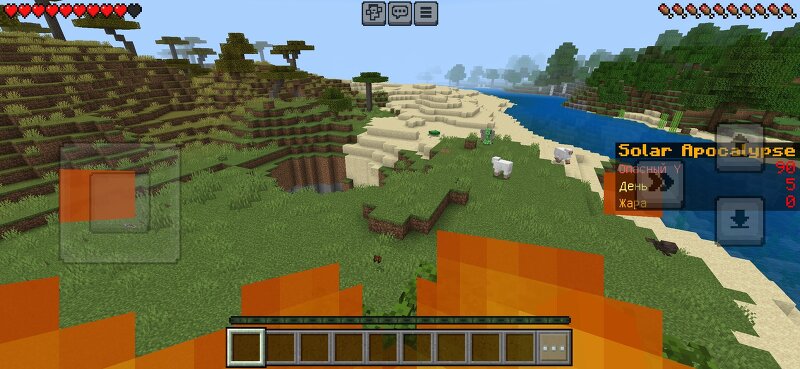
☀ Solar ApocalypseA progressive solar disaster for Minecraft Bedrock The sun is no longer your friend. Day by day it grows hotter and more dangerous. Grass withers, water evaporates, and the fire slowly sinks deeper — even into the mines. Can you survive? What this addon does Progressive Apocalypse• Day 3–4 — the world starts changing• Day 5+ — sunlight burns unprotected players• Day 7+ — surface water begins to evaporate• The danger zone slowly drops lower: Y ≥ 90 → Y ≥ 60 → Y ≥ 30 → Y ≥ 0 → Y ≥ -20 → almost to bedrock Protection System• Armor actually protects you from the sun• Leather → Iron → Diamond → Netherite — better gear is required as days pass• Water gives a strong temporary protection bonus• Fire Resistance potions fully protect you Indicators• Sidebar shows current day and danger height• Action bar displays day, stage, and your protection (X/Y) Commands• !solar / !solar day — quick status• !solar status — detailed info• !solar hide / !solar show — toggle sidebar• !solar setday <number> — set the day (creative or admin tag) Installation1. Download and open the .mcaddon2. Create a world and enable both Behavior Pack and Resource Pack3. Turn on Beta APIs in Experiments4.
Added value
What’s included on this page
Preview, categories, compatibility, and tools on this page — not a bare file mirror.
- Creator
- Sergey7363635
- Source
- Minecraft downloads library on Eaglercraft Studio
- Type
- Minecraft mod
- Price
- Free download on Eaglercraft Studio
- Curation
- Listed with credit to Sergey7363635 · studio preview & install guide
- Game Version
- Minecraft 26.3 snapshot
- Compatible with
- Minecraft Java (match version / loader in facts)
- Tags
- Apocalypse, Minecraft, New Content, Solar
Install guide
How to install this free Minecraft mod
Eaglercraft Studio listing with metadata, creator credit, and loader-aware install guidance.
- 1Download the jar/zip when available.
- 2Install the matching loader (Forge, Fabric, or NeoForge) for your Minecraft version.
- 3Drop the mod into your mods folder, then launch with that profile.
Wrong loader or game version usually crashes on startup — read the facts on this page first.
Related free mods
More curated mods from the same library section.

Pastelmooncrafting15 · 67 diamonds · 20 views

PotatoWolfie · 60 diamonds · 2 views

PotatoWolfie · 53 diamonds · 622 views

Janss_33PL · 47 diamonds · 940 views