
Soleron - 26.1.2 Minecraft Shader
Creator: xsoras · 2026-06-05 · Mods · Free on Eaglercraft Studio
Download Soleron - 26.1.2 Minecraft Shader — free Minecraft mod. Created by xsoras. Tagged aesthetic, beast, best, godrays. Check the file details for Forge, Fabric, or NeoForge before installing.
Creator notes
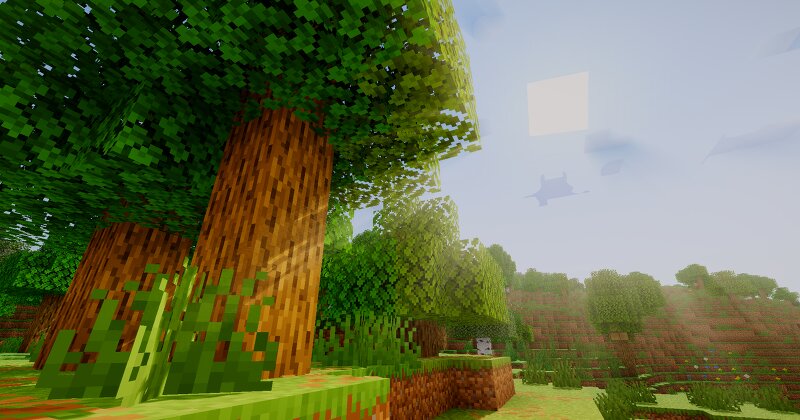
Cold atmosphere. Warm light. No compromise. Soleron is a performance-conscious Minecraft Java shader built for players who want cinematic visuals without sacrificing control. Every feature is slider-tunable directly from the in-game shader menu — no config file editing required. ✨ Highlights Soft Shadows that actually look soft. Soleron uses PCSS (Percentage-Closer Soft Shadows) paired with a 32-sample Poisson PCF filter on a 4096px shadow map. Shadows widen naturally as distance from the caster increases — just like real sunlight. Shadow softness, bias, sample count and search radius are all slider-adjustable. Volumetric God Rays with moonlight. An 80-sample raymarched god ray pass casts dramatic light shafts through trees, windows and overhangs. Works at night too — moonlight casts its own subtle shafts. Density, decay and weight are fully configurable. Six tone mapping operators. Choose between Reinhard, ACES, Hable, Lottes, Uchimura and AgX from the shader menu. ACES is the default — punchy highlights, deep shadows, no blown-out skies. Colored shadows. Stained glass, leaves and translucent blocks cast tinted shadows on the ground. Three quality tiers: off, balanced, high. Veg
Added value
What’s included on this page
Preview, categories, compatibility, and tools on this page — not a bare file mirror.
- Creator
- xsoras
- Source
- Minecraft downloads library on Eaglercraft Studio
- Type
- Minecraft mod
- Price
- Free download on Eaglercraft Studio
- Curation
- Listed with credit to xsoras · studio preview & install guide
- Game Version
- Minecraft 26.1.2
- Compatible with
- Minecraft Java (match version / loader in facts)
- Tags
- Aesthetic, Beast, Best, Godrays, Green, Lensflare
Install guide
How to install this free Minecraft mod
Eaglercraft Studio listing with metadata, creator credit, and loader-aware install guidance.
- 1Download the jar/zip when available.
- 2Install the matching loader (Forge, Fabric, or NeoForge) for your Minecraft version.
- 3Drop the mod into your mods folder, then launch with that profile.
Wrong loader or game version usually crashes on startup — read the facts on this page first.
Related free mods
More curated mods from the same library section.

Pastelmooncrafting15 · 67 diamonds · 20 views

PotatoWolfie · 60 diamonds · 2 views

PotatoWolfie · 53 diamonds · 622 views

Janss_33PL · 47 diamonds · 940 views