
Spawner Pickup add-on "Capture and Relocate Spawners easly"
Creator: shadowGem100k · 2026-02-03 · Mods · Free on Eaglercraft Studio
Download Spawner Pickup add-on "Capture and Relocate Spawners easly" — free Minecraft mod. Created by shadowGem100k. Tagged other. Check the file details for Forge, Fabric, or NeoForge before installing.
Creator notes
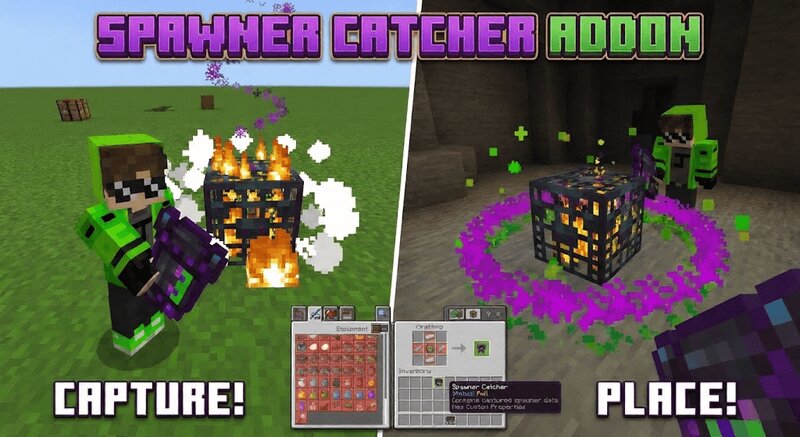
🧿 Spawner Catcher Addon Capture and Relocate Spawners for Minecraft Bedrock 1.21+ Spawner Catcher Addon is a powerful Minecraft Bedrock survival utility addon that allows players to safely capture mob spawners and place them anywhere they want. It introduces a special Spawner Catcher item that stores spawner data inside itself and lets you relocate spawners without breaking them or using commands. This addon is designed for grinders, farms, and base building while remaining balanced through durability and cooldown mechanics. If you are looking for a Minecraft Bedrock spawner pickup addon, spawner mover mod, spawner relocation system, or survival spawner tool, this addon provides a clean and immersive solution that works naturally in survival gameplay and on SMP servers. 🧠 What This Spawner Catcher Addon Does Players use the Spawner Catcher item on a mob spawner to capture it. The spawner is removed from the world and stored inside the item as structure data. The item remembers the captured spawner and becomes full until it is placed again. When used on another block face, the spawner is placed back into the world at the target location. 🔮 Real Capture and Placement System The addon
Added value
What’s included on this page
Preview, categories, compatibility, and tools on this page — not a bare file mirror.
- Creator
- shadowGem100k
- Source
- Minecraft downloads library on Eaglercraft Studio
- Type
- Minecraft mod
- Price
- Free download on Eaglercraft Studio
- Curation
- Listed with credit to shadowGem100k · studio preview & install guide
- Game Version
- Minecraft 1.21.11
- Compatible with
- Minecraft Java (match version / loader in facts)
- Tags
- Other
Install guide
How to install this free Minecraft mod
Eaglercraft Studio listing with metadata, creator credit, and loader-aware install guidance.
- 1Download the jar/zip when available.
- 2Install the matching loader (Forge, Fabric, or NeoForge) for your Minecraft version.
- 3Drop the mod into your mods folder, then launch with that profile.
Wrong loader or game version usually crashes on startup — read the facts on this page first.
Related free mods
More curated mods from the same library section.

Pastelmooncrafting15 · 67 diamonds · 20 views

PotatoWolfie · 60 diamonds · 2 views

PotatoWolfie · 53 diamonds · 622 views

Janss_33PL · 47 diamonds · 940 views