
SuperRH bosses
Creator: SuperRH · 2026-02-18 · Mods · Free on Eaglercraft Studio
Download SuperRH bosses — free Minecraft mod. Created by SuperRH. Tagged battle, boss, funneh, funny. Check the file details for Forge, Fabric, or NeoForge before installing.
Creator notes
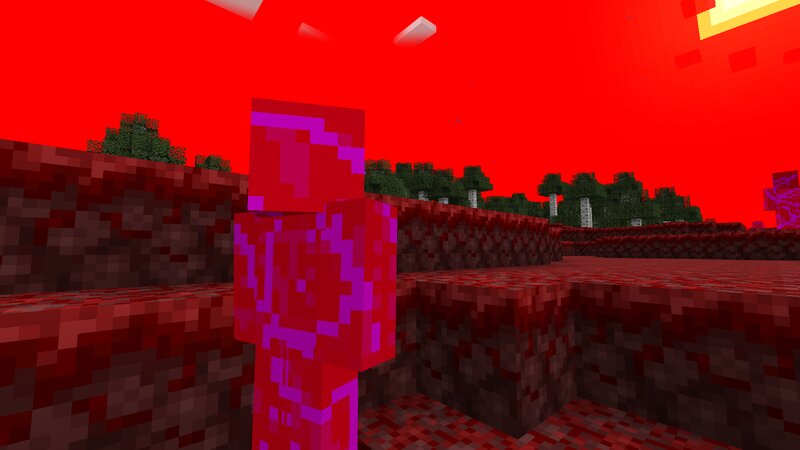
This mod brings powerful new content to Minecraft, adding fresh exploration, intense combat, and high-tier rewards for players seeking a greater challenge. Discover a bold new red biome that transforms the landscape with deep crimson terrain and a dramatic atmosphere. Its unique look makes it stand out immediately from the overworld, creating a dangerous and mysterious environment that feels completely different from vanilla Minecraft. In addition to the biome, the mod introduces a devastating new boss: Superrh19054 . With an enormous 1000 health, this boss is designed to push even well-equipped players to their limits. Superrh19054 fights aggressively, charging straight at you to deal heavy damage and constantly applying pressure. Trying to create distance won’t save you — the boss can leap at extremely high speeds, instantly closing gaps and forcing you into a fast-paced, high-intensity battle. Strategy, mobility, and strong gear are essential if you want to survive. Defeating Superrh19054 is no small feat — but the reward is worth it. The boss drops an incredibly powerful item capable of dealing over 200 damage, making it one of the strongest weapons you can obtain. This overpow
Added value
What’s included on this page
Preview, categories, compatibility, and tools on this page — not a bare file mirror.
- Creator
- SuperRH
- Source
- Minecraft downloads library on Eaglercraft Studio
- Type
- Minecraft mod
- Price
- Free download on Eaglercraft Studio
- Curation
- Listed with credit to SuperRH · studio preview & install guide
- Game Version
- Minecraft 1.21.8
- Compatible with
- Minecraft Java (match version / loader in facts)
- Tags
- Battle, Boss, Funneh, Funny, Mod, Mods
Install guide
How to install this free Minecraft mod
Eaglercraft Studio listing with metadata, creator credit, and loader-aware install guidance.
- 1Download the jar/zip when available.
- 2Install the matching loader (Forge, Fabric, or NeoForge) for your Minecraft version.
- 3Drop the mod into your mods folder, then launch with that profile.
Wrong loader or game version usually crashes on startup — read the facts on this page first.
Related free mods
More curated mods from the same library section.

Pastelmooncrafting15 · 67 diamonds · 20 views

PotatoWolfie · 60 diamonds · 2 views

PotatoWolfie · 53 diamonds · 622 views

Janss_33PL · 47 diamonds · 940 views