
SurvivalCreativity
Creator: Ortero · 2026-07-29 · Mods · Free on Eaglercraft Studio
Download SurvivalCreativity — free Minecraft mod. Created by Ortero. Tagged building, creative, functional, hologram. Check the file details for Forge, Fabric, or NeoForge before installing.
Creator notes
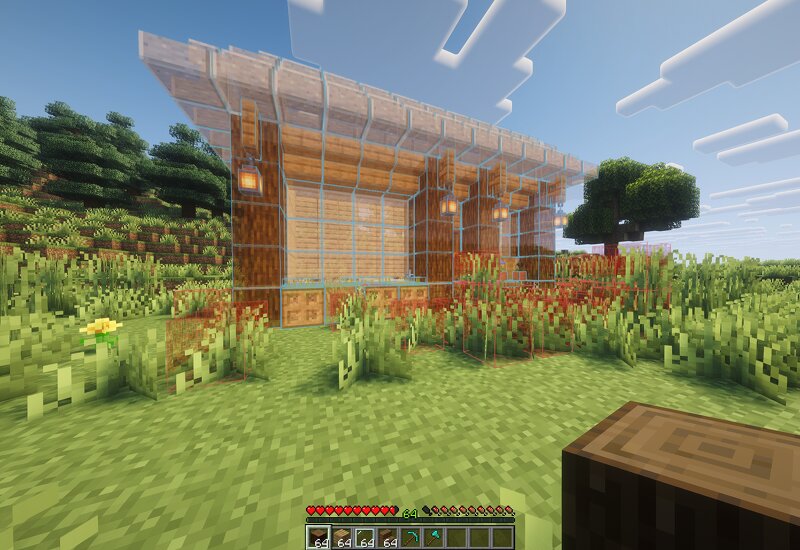
Client-side mod for Minecraft. Enter a local creative-like imagination, save your build, then preview it as a hologram in survival while you place the real blocks. The switch between Imaginary Creative and actual survival world is seamless and instant, allowing you to very quickly sketch out a build in creative and actually complete it in survival. Unlike other mods for creative sketches brought to survival, with this one you can actually take advantage of the real terrain around you. The mod is completely client sided and works in multiplayer servers as well. (So long as the server does not time you out for AFK-ing while in the imaginary realm) There is also a function for sharing holograms with other players, though if the holograms are large a server side mod would be required. For small builds shares work through the chat without the need for a server mod. In the imaginary realm you get to control everything in the world, such as time, weather and mobs. The project is completely open source, and you can contribute with your ideas! You can find the github link connected to this page.
Added value
What’s included on this page
Preview, categories, compatibility, and tools on this page — not a bare file mirror.
- Creator
- Ortero
- Source
- Minecraft downloads library on Eaglercraft Studio
- Type
- Minecraft mod
- Price
- Free download on Eaglercraft Studio
- Curation
- Listed with credit to Ortero · studio preview & install guide
- Game Version
- Minecraft 26.2
- Compatible with
- Minecraft Java (match version / loader in facts)
- Tags
- Building, Creative, Functional, Hologram, Qol, Survival
Install guide
How to install this free Minecraft mod
Eaglercraft Studio listing with metadata, creator credit, and loader-aware install guidance.
- 1Download the jar/zip when available.
- 2Install the matching loader (Forge, Fabric, or NeoForge) for your Minecraft version.
- 3Drop the mod into your mods folder, then launch with that profile.
Wrong loader or game version usually crashes on startup — read the facts on this page first.
Related free mods
More curated mods from the same library section.

Pastelmooncrafting15 · 67 diamonds · 20 views

PotatoWolfie · 60 diamonds · 2 views

PotatoWolfie · 53 diamonds · 622 views

Janss_33PL · 47 diamonds · 940 views