
TechnicCraft (1.18.2)
Creator: TimkaTheCat · 2026-03-06 · Mods · Free on Eaglercraft Studio
Download TechnicCraft (1.18.2) — free Minecraft mod. Created by TimkaTheCat. Tagged bomb, energy, factory, generator. Check the file details for Forge, Fabric, or NeoForge before installing.
Creator notes
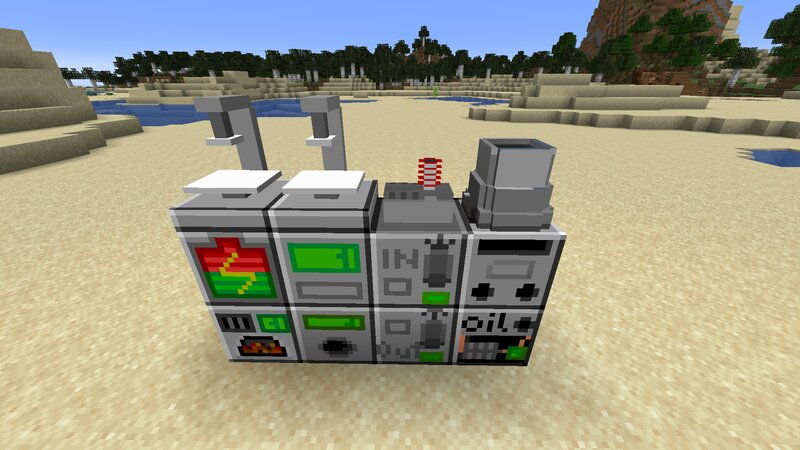
TechnicCraft - create sophisticated mechanisms with ease! Version: 1.18.2 Forge TechnicCraft is a mod, adding wide variety of blocks, such as Coal Generator, Battery and Milling Machine, and items, like Enriched Uranium, Coin or the Copper Wire. First, you should obtain energy. You can get it using the Coal Generator, producing it from coal, Oil Generator, producing it from Oil found in the Oil Lakes, generated throughout the world, and the Nuclear Reactor, producing it from heat. Scattered around the world are three new structures - The Factory, offering an early-game boost to development in the mod, Crashed Rocket with advanced items and mechanisms, and The Laboratory with useful materials to help the player. To help with defense in the unpredictable world, a Knife and a Weapon are present. Both are creatable using the Precision Milling Machine. One of the most engaging parts of gameplay is the Nuclear System. You can mine Uranium Ore, common underground in caves, which can be milled to produce Yellowcake. Using an Uranium Refinery, it can be used to obtain Depleted Uranium, useful in creating tools, and Enriched Uranium. It is used to make the Nuclear Bomb, which has a tremendou
Added value
What’s included on this page
Preview, categories, compatibility, and tools on this page — not a bare file mirror.
- Creator
- TimkaTheCat
- Source
- Minecraft downloads library on Eaglercraft Studio
- Type
- Minecraft mod
- Price
- Free download on Eaglercraft Studio
- Curation
- Listed with credit to TimkaTheCat · studio preview & install guide
- Game Version
- Minecraft 1.18.1
- Compatible with
- Minecraft Java (match version / loader in facts)
- Tags
- Bomb, Energy, Factory, Generator, Industry, Mill
Install guide
How to install this free Minecraft mod
Eaglercraft Studio listing with metadata, creator credit, and loader-aware install guidance.
- 1Download the jar/zip when available.
- 2Install the matching loader (Forge, Fabric, or NeoForge) for your Minecraft version.
- 3Drop the mod into your mods folder, then launch with that profile.
Wrong loader or game version usually crashes on startup — read the facts on this page first.
Related free mods
More curated mods from the same library section.

Pastelmooncrafting15 · 67 diamonds · 20 views

PotatoWolfie · 60 diamonds · 2 views

PotatoWolfie · 53 diamonds · 622 views

Janss_33PL · 47 diamonds · 940 views