
The Calibrated Redstone Lamp Addon (Java V26.1.2)
Creator: coolhouse · 2026-08-22 · Mods · Free on Eaglercraft Studio
Download The Calibrated Redstone Lamp Addon (Java V26.1.2) — free Minecraft mod. Created by coolhouse. Tagged new content, newblock, newmechanic, newredstoneblock. Check the file details for Forge, Fabric, or NeoForge before installing.
Creator notes
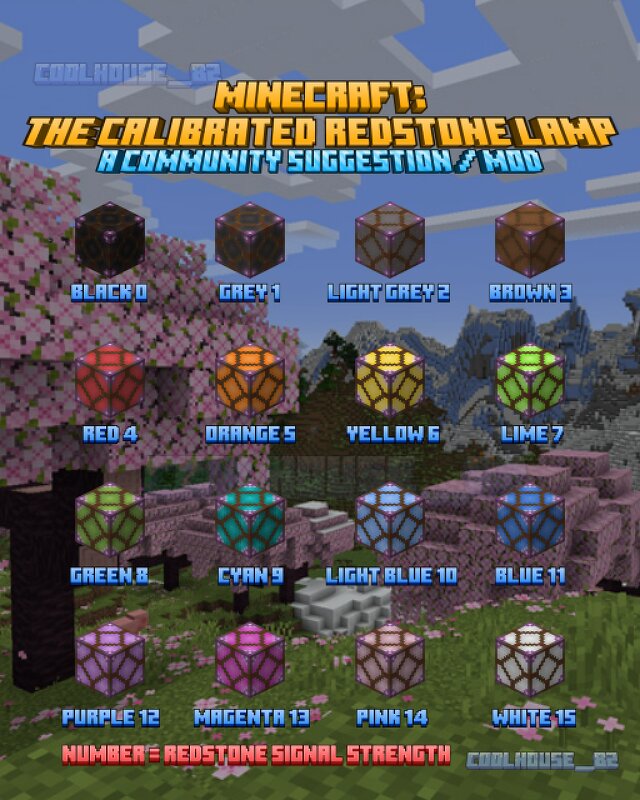
Reddit u/coolhouse_82 Mod Link for my Calibrated Redstone Lamp Feature Suggestion Block state changes depending on total redstone power entering it. The calibrated lamp uses the refractivity of amethyst crystals to change the color of the lamp depending on the strength of the redstone signal. Use it in farm, mini games and more. Here are the colours the lamp can be: Signal 0: Turned off and completely dark (Black). Signal 1: Grey Signal 2: Light Grey Signal 3: Brown Signal 4: Red Signal 5: Orange Signal 6: Yellow Signal 7: Lime Signal 8: Green Signal 9: Cyan Signal 10: Light Blue Signal 11: Dark Blue Signal 12: Purple Signal 13: Magenta Signal 14: Pink Signal 15: White Lamp's current status can be read by a comparator. minecraft version=26.1.2 loader version=0.19.3 loom version=1.17-SNAPSHOT
Added value
What’s included on this page
Preview, categories, compatibility, and tools on this page — not a bare file mirror.
- Creator
- coolhouse
- Source
- Minecraft downloads library on Eaglercraft Studio
- Type
- Minecraft mod
- Price
- Free download on Eaglercraft Studio
- Curation
- Listed with credit to coolhouse · studio preview & install guide
- Game Version
- Minecraft 26.1.2
- Compatible with
- Minecraft Java (match version / loader in facts)
- Tags
- New Content, Newblock, Newmechanic, Newredstoneblock, Redstone, Redstonelamp
Install guide
How to install this free Minecraft mod
Eaglercraft Studio listing with metadata, creator credit, and loader-aware install guidance.
- 1Download the jar/zip when available.
- 2Install the matching loader (Forge, Fabric, or NeoForge) for your Minecraft version.
- 3Drop the mod into your mods folder, then launch with that profile.
Wrong loader or game version usually crashes on startup — read the facts on this page first.
Related free mods
More curated mods from the same library section.

Pastelmooncrafting15 · 67 diamonds · 20 views

PotatoWolfie · 60 diamonds · 2 views

PotatoWolfie · 53 diamonds · 622 views

Janss_33PL · 47 diamonds · 940 views