
The Lost Levels
Creator: ButterBoyRS · 2026-07-20 · Mods · Free on Eaglercraft Studio
Download The Lost Levels — free Minecraft mod. Created by ButterBoyRS. Tagged backrooms, functional. Check the file details for Forge, Fabric, or NeoForge before installing.
Creator notes
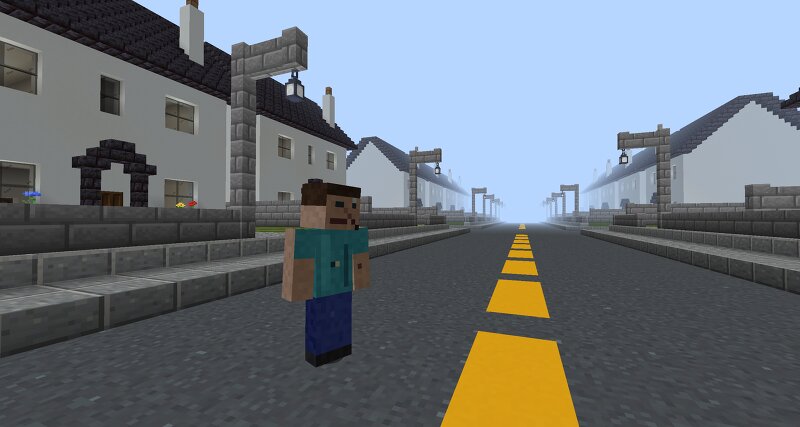
The Lost Levels The Lost Levels is a Backrooms-inspired horror and exploration mod that adds several liminal dimensions to Minecraft. Instead of entering through a portal, you can accidentally noclip out of reality by flying into a wall, falling in the wrong place, or running into a wall. Once you enter, you will need to explore each level and find a way out. Current Levels The Yellow Halls A huge maze of yellow rooms and hallways filled with buzzing lights. The area is confusing, repetitive, and easy to get lost in. The Poolrooms A large network of tiled rooms, flooded hallways, and indoor pools. Some areas are calm and open, while others are dark, cramped, and much deeper than they look. The Neighborhood A quiet neighborhood with repeating streets and houses. The roads can loop back around, something may be watching you from inside the houses, and making the wrong choice can reset your escape progress. Features Multiple Backrooms-inspired dimensions Procedurally generated levels Noclip-style ways to enter Hidden exits between levels Creatures and other dangers Unique escape mechanics Custom sounds and atmosphere More levels planned for future updates There are no normal portals l
Added value
What’s included on this page
Preview, categories, compatibility, and tools on this page — not a bare file mirror.
- Creator
- ButterBoyRS
- Source
- Minecraft downloads library on Eaglercraft Studio
- Type
- Minecraft mod
- Price
- Free download on Eaglercraft Studio
- Curation
- Listed with credit to ButterBoyRS · studio preview & install guide
- Game Version
- Minecraft 1.21.11
- Compatible with
- Minecraft Java (match version / loader in facts)
- Tags
- Backrooms, Functional
Install guide
How to install this free Minecraft mod
Eaglercraft Studio listing with metadata, creator credit, and loader-aware install guidance.
- 1Download the jar/zip when available.
- 2Install the matching loader (Forge, Fabric, or NeoForge) for your Minecraft version.
- 3Drop the mod into your mods folder, then launch with that profile.
Wrong loader or game version usually crashes on startup — read the facts on this page first.
Related free mods
More curated mods from the same library section.

Pastelmooncrafting15 · 67 diamonds · 20 views

PotatoWolfie · 60 diamonds · 2 views

PotatoWolfie · 53 diamonds · 622 views

Janss_33PL · 47 diamonds · 940 views