
The Parallel — Stalker Minecraft bedrock edition
Creator: Sergey7363635 · 2026-08-22 · Mods · Free on Eaglercraft Studio
Download The Parallel — Stalker Minecraft bedrock edition — free Minecraft mod. Created by Sergey7363635. Tagged addon, horror, new content, scary. Check the file details for Forge, Fabric, or NeoForge before installing.
Creator notes
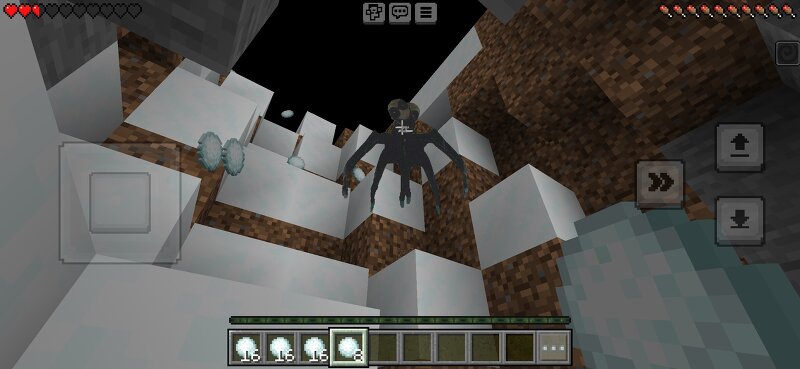
THE PARALLEL — STALKER & WATCHERBedrock Edition Addon | Horror He sees you in the dark. This addon adds two entities inspired by The Parallel: ━━━━━━━━━━━━━━━━━━━━━━━━━━━━STALKER (parallel:stalker)━━━━━━━━━━━━━━━━━━━━━━━━━━━━• Spawns far from the player on the 3rd in-game day• Runs toward the player and attacks• Can break many blocks• Applies Darkness III when nearby• High health and strong damage ━━━━━━━━━━━━━━━━━━━━━━━━━━━━WATCHER (parallel:stalker2)━━━━━━━━━━━━━━━━━━━━━━━━━━━━• Spawns near trees (especially at night)• Does not move, attack, or break blocks• Does not apply darkness• Always looks at the player• Disappears if you get too close (\~8 blocks) ━━━━━━━━━━━━━━━━━━━━━━━━━━━━FEATURES━━━━━━━━━━━━━━━━━━━━━━━━━━━━• Custom textures & models• Script-based day-3 spawn• Ambient Watcher spawns at night near logs• Darkness aura from the Stalker• Spawn eggs in Creative ━━━━━━━━━━━━━━━━━━━━━━━━━━━━INSTALLATION━━━━━━━━━━━━━━━━━━━━━━━━━━━━1. Download the .mcaddon2. Open it with Minecraft3. Create or edit a world4. Enable both Behavior Pack and Resource Pack5. Enable Beta APIs / Holiday Creator Features if asked6. Play in Survival for the full experience ━━━━━━━━━━━━━━━━━━━━━━━━━━━━COMM
Added value
What’s included on this page
Preview, categories, compatibility, and tools on this page — not a bare file mirror.
- Creator
- Sergey7363635
- Source
- Minecraft downloads library on Eaglercraft Studio
- Type
- Minecraft mod
- Price
- Free download on Eaglercraft Studio
- Curation
- Listed with credit to Sergey7363635 · studio preview & install guide
- Game Version
- Minecraft 26.3 snapshot
- Compatible with
- Minecraft Java (match version / loader in facts)
- Tags
- Addon, Horror, New Content, Scary
Install guide
How to install this free Minecraft mod
Eaglercraft Studio listing with metadata, creator credit, and loader-aware install guidance.
- 1Download the jar/zip when available.
- 2Install the matching loader (Forge, Fabric, or NeoForge) for your Minecraft version.
- 3Drop the mod into your mods folder, then launch with that profile.
Wrong loader or game version usually crashes on startup — read the facts on this page first.
Related free mods
More curated mods from the same library section.

Pastelmooncrafting15 · 67 diamonds · 20 views

PotatoWolfie · 60 diamonds · 2 views

PotatoWolfie · 53 diamonds · 622 views

Janss_33PL · 47 diamonds · 940 views