
The Rift
Creator: HelperAdminPie · 2026-09-08 · Mods · Free on Eaglercraft Studio
Download The Rift — free Minecraft mod. Created by HelperAdminPie. Tagged beta, beta173, mc, minecraft. Check the file details for Forge, Fabric, or NeoForge before installing.
Creator notes
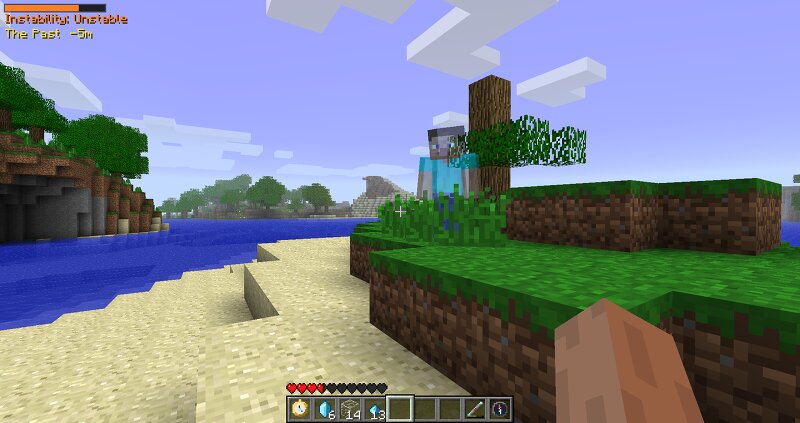
The Rift The Rift is a time travel mod for Minecraft Beta 1.7.3 , built using Fabric and requiring StationAPI to run. Manipulate the past and future, discover mysterious ruins, and experiment with the unstable forces hidden within the Rift. ⚠️ Required Dependencies Babric Loader — Required to load the mod. StationAPI — Required for The Rift to function. Minecraft Beta 1.7.3 — The mod's target version. ⏳ Time Travel Pocket Watch Travel between the past, present, and future . Time Anchor Anchor the past into the future, allowing the past to influence what comes later. Recall Lens See your own past self existing in the present. Time Compass Locate the mysterious ruins hidden throughout the world. 💠 The Rift Rift A mysterious block that can be interacted with using glass to create Rift Shards . Rift Shards Obtained by using glass on a Rift . Rift Shards are essential for crafting Rift Crystals . Rift Crystal A powerful material required to create the time-based items. Salvage Travel into the future and recover materials from blocks that have broken down over time. ⚠️ Instability Manipulating time increases your instability . The Calm Rod can be used to reduce your instability before it
Added value
What’s included on this page
Preview, categories, compatibility, and tools on this page — not a bare file mirror.
- Creator
- HelperAdminPie
- Source
- Minecraft downloads library on Eaglercraft Studio
- Type
- Minecraft mod
- Price
- Free download on Eaglercraft Studio
- Curation
- Listed with credit to HelperAdminPie · studio preview & install guide
- Game Version
- Minecraft 1.7 beta
- Compatible with
- Minecraft Java (match version / loader in facts)
- Tags
- Beta, Beta173, Mc, Minecraft, Minecraftmods, Mod
Install guide
How to install this free Minecraft mod
Eaglercraft Studio listing with metadata, creator credit, and loader-aware install guidance.
- 1Download the jar/zip when available.
- 2Install the matching loader (Forge, Fabric, or NeoForge) for your Minecraft version.
- 3Drop the mod into your mods folder, then launch with that profile.
Wrong loader or game version usually crashes on startup — read the facts on this page first.
Related free mods
More curated mods from the same library section.

Pastelmooncrafting15 · 67 diamonds · 20 views

PotatoWolfie · 60 diamonds · 2 views

PotatoWolfie · 53 diamonds · 622 views

Janss_33PL · 47 diamonds · 940 views