
The Train Mod
Creator: AboodTube · 2026-02-13 · Mods · Free on Eaglercraft Studio
Download The Train Mod — free Minecraft mod. Created by AboodTube. Tagged functional, latest, mod, railway. Check the file details for Forge, Fabric, or NeoForge before installing.
Creator notes
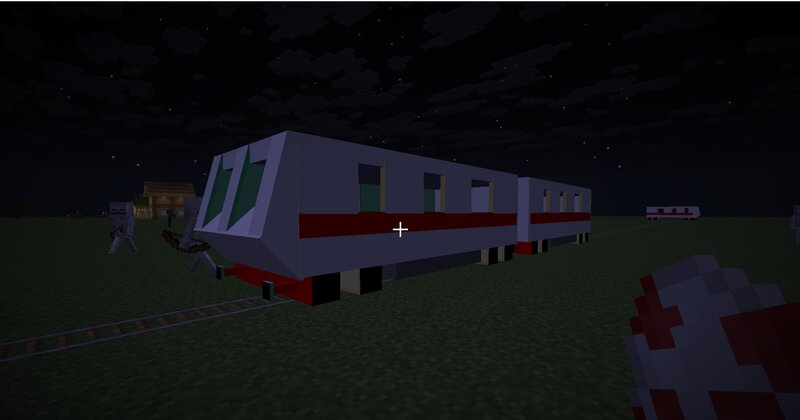
This is the latest train mod for Minecraft 1.21.8. Trains mods for Mincraft have barely been developed these days and so I decided to create one of my own. This mod comes with the following - Passenger Train - Passenger Train Car - Steam Train - Passenger Car - Cargo Train - Cargo Car Now you may notice that there is no coupler item, and creating one is hard. So you should type in these commands , one for the propmt, and one for the command block: EXAMPLE: At the front, of the train, paste in this example: /tag @e[type=train_mod:passenger_train,limit=1,distance=..5] add front And for the first car: /tag @e[type=train_mod:passenger_train,limit=1,distance=..5] add car1 Then: /tag @e[type=train_mod:passenger_train,limit=1,distance=..5] add car2 And so on... Then get a command block with this command: give @p command_block Open it up, ensure it is set to Repeat and Always Active, and then paste in the following: execute as @e[tag=car1] at @e[tag=front] run tp @s ^10 ^ ^ NOTE: For more than one carriage, repeat the same command by placing more command blocks with the same settings above, and paste like this example here: execute as @e[tag=car2] at @e[tag=car1] run tp @s ^10 ^ ^ execute
Added value
What’s included on this page
Preview, categories, compatibility, and tools on this page — not a bare file mirror.
- Creator
- AboodTube
- Source
- Minecraft downloads library on Eaglercraft Studio
- Type
- Minecraft mod
- Price
- Free download on Eaglercraft Studio
- Curation
- Listed with credit to AboodTube · studio preview & install guide
- Game Version
- Minecraft 1.21.8
- Compatible with
- Minecraft Java (match version / loader in facts)
- Tags
- Functional, Latest, Mod, Railway, Train, Vehicle
Install guide
How to install this free Minecraft mod
Eaglercraft Studio listing with metadata, creator credit, and loader-aware install guidance.
- 1Download the jar/zip when available.
- 2Install the matching loader (Forge, Fabric, or NeoForge) for your Minecraft version.
- 3Drop the mod into your mods folder, then launch with that profile.
Wrong loader or game version usually crashes on startup — read the facts on this page first.
Related free mods
More curated mods from the same library section.

Pastelmooncrafting15 · 67 diamonds · 20 views

PotatoWolfie · 60 diamonds · 2 views

PotatoWolfie · 53 diamonds · 622 views

Janss_33PL · 47 diamonds · 940 views