
The Unseen entity Minecraft bedrock edition
Creator: Sergey7363635 · 2026-08-30 · Mods · Free on Eaglercraft Studio
Download The Unseen entity Minecraft bedrock edition — free Minecraft mod. Created by Sergey7363635. Tagged entity, horror, new content, scary. Check the file details for Forge, Fabric, or NeoForge before installing.
Creator notes
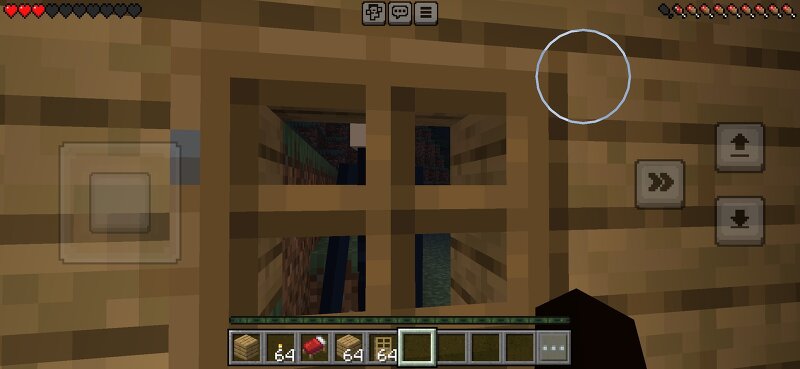
The Unseen Entity You are being watched. The Unseen Entity is a horror addon for Minecraft Bedrock Edition.It adds a tall, slender creature that stalks the player from the shadows. This is not a loud jumpscare mob.It prefers to stay hidden — watching from a distance, standing near windows and doors, waiting for the right moment to move closer. Features:• Custom horror entity with a pale face and long thin body• Stalking behavior — approaches slowly, then attacks• Appears near windows and doors (especially at night)• Rare natural spawn• Atmospheric horror feel• Summon with /summon unseen:entity• Spawn egg included How to install:1. Download the .mcaddon2. Open it with Minecraft3. Enable both Behavior Pack and Resource Pack in your world4. For full door/window spawning, enable Beta APIs / Scripting experiments Notes:Best experienced in Survival at night.Keep the lights on.Watch the windows. Made for players who like tense, atmospheric horror instead of constant jumpscares.
Added value
What’s included on this page
Preview, categories, compatibility, and tools on this page — not a bare file mirror.
- Creator
- Sergey7363635
- Source
- Minecraft downloads library on Eaglercraft Studio
- Type
- Minecraft mod
- Price
- Free download on Eaglercraft Studio
- Curation
- Listed with credit to Sergey7363635 · studio preview & install guide
- Game Version
- Minecraft 26.3 snapshot
- Compatible with
- Minecraft Java (match version / loader in facts)
- Tags
- Entity, Horror, New Content, Scary
Install guide
How to install this free Minecraft mod
Eaglercraft Studio listing with metadata, creator credit, and loader-aware install guidance.
- 1Download the jar/zip when available.
- 2Install the matching loader (Forge, Fabric, or NeoForge) for your Minecraft version.
- 3Drop the mod into your mods folder, then launch with that profile.
Wrong loader or game version usually crashes on startup — read the facts on this page first.
Related free mods
More curated mods from the same library section.

Pastelmooncrafting15 · 67 diamonds · 20 views

PotatoWolfie · 60 diamonds · 2 views

PotatoWolfie · 53 diamonds · 622 views

Janss_33PL · 47 diamonds · 940 views