
Titan Performance
Creator: LeoneDev · 2026-01-31 · Mods · Free on Eaglercraft Studio
Download Titan Performance — free Minecraft mod. Created by LeoneDev. Tagged other. Check the file details for Forge, Fabric, or NeoForge before installing.
Creator notes
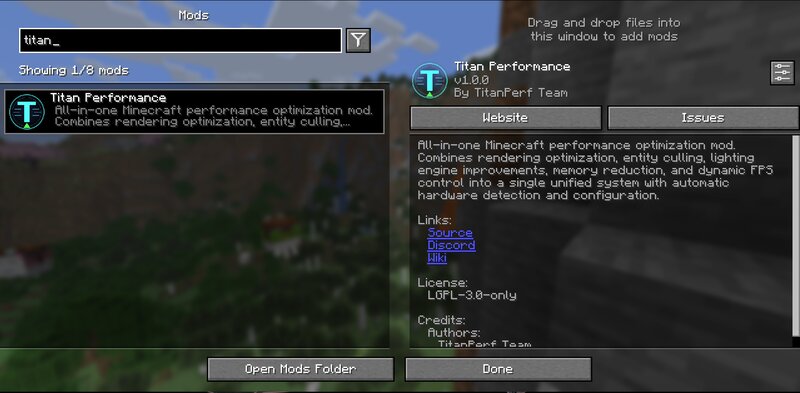
What Titan Performance Does Titan Performance provides a collection of optimization modules that can help improve performance in Minecraft. Results vary depending on your hardware, world complexity, and other installed mods. Optimization Modules Include: Rendering Optimizer - Adjusts chunk update scheduling Entity Culler - Skips rendering entities outside your view frustum Entity Throttler - Reduces tick frequency for distant entities Lighting Optimizer - Batches light update calculations Memory Optimizer - Reduces object allocations through pooling Particle Optimizer - Reduces particle rendering in busy scenes Smooth FPS - Attempts to reduce frame time spikes Dynamic FPS - Limits frame rate when the game is unfocused or in menus Features Single Settings Screen - Configure all modules from one place Hardware Detection - Attempts to suggest settings based on your system Iris Compatibility - Designed to work alongside Iris Shaders ModMenu Integration - Access settings through ModMenu Installation Install Fabric Loader (0.16.0+) Install Fabric API Place Titan Performance in your mods folder Launch the game Requirements Minecraft 1.21.8 or 1.21.11 Fabric Loader 0.16.0+ Fabric API Compa
Added value
What’s included on this page
Preview, categories, compatibility, and tools on this page — not a bare file mirror.
- Creator
- LeoneDev
- Source
- Minecraft downloads library on Eaglercraft Studio
- Type
- Minecraft mod
- Price
- Free download on Eaglercraft Studio
- Curation
- Listed with credit to LeoneDev · studio preview & install guide
- Game Version
- Minecraft 1.21.11
- Compatible with
- Minecraft Java (match version / loader in facts)
- Tags
- Other
Install guide
How to install this free Minecraft mod
Eaglercraft Studio listing with metadata, creator credit, and loader-aware install guidance.
- 1Download the jar/zip when available.
- 2Install the matching loader (Forge, Fabric, or NeoForge) for your Minecraft version.
- 3Drop the mod into your mods folder, then launch with that profile.
Wrong loader or game version usually crashes on startup — read the facts on this page first.
Related free mods
More curated mods from the same library section.

Pastelmooncrafting15 · 67 diamonds · 20 views

PotatoWolfie · 60 diamonds · 2 views

PotatoWolfie · 53 diamonds · 622 views

Janss_33PL · 47 diamonds · 940 views